
Vizard alternative for creators who clip, caption and publish in one place
Vizard is a clipping tool with a transcript editor and a timeline, and it prices in minutes of video. AutoPoster AI suits you if you want clips plus voice, image and music tools and a scheduler that reaches networks Vizard doesn't name. We have no transcript or timeline editor.
Choose AutoPoster AI if
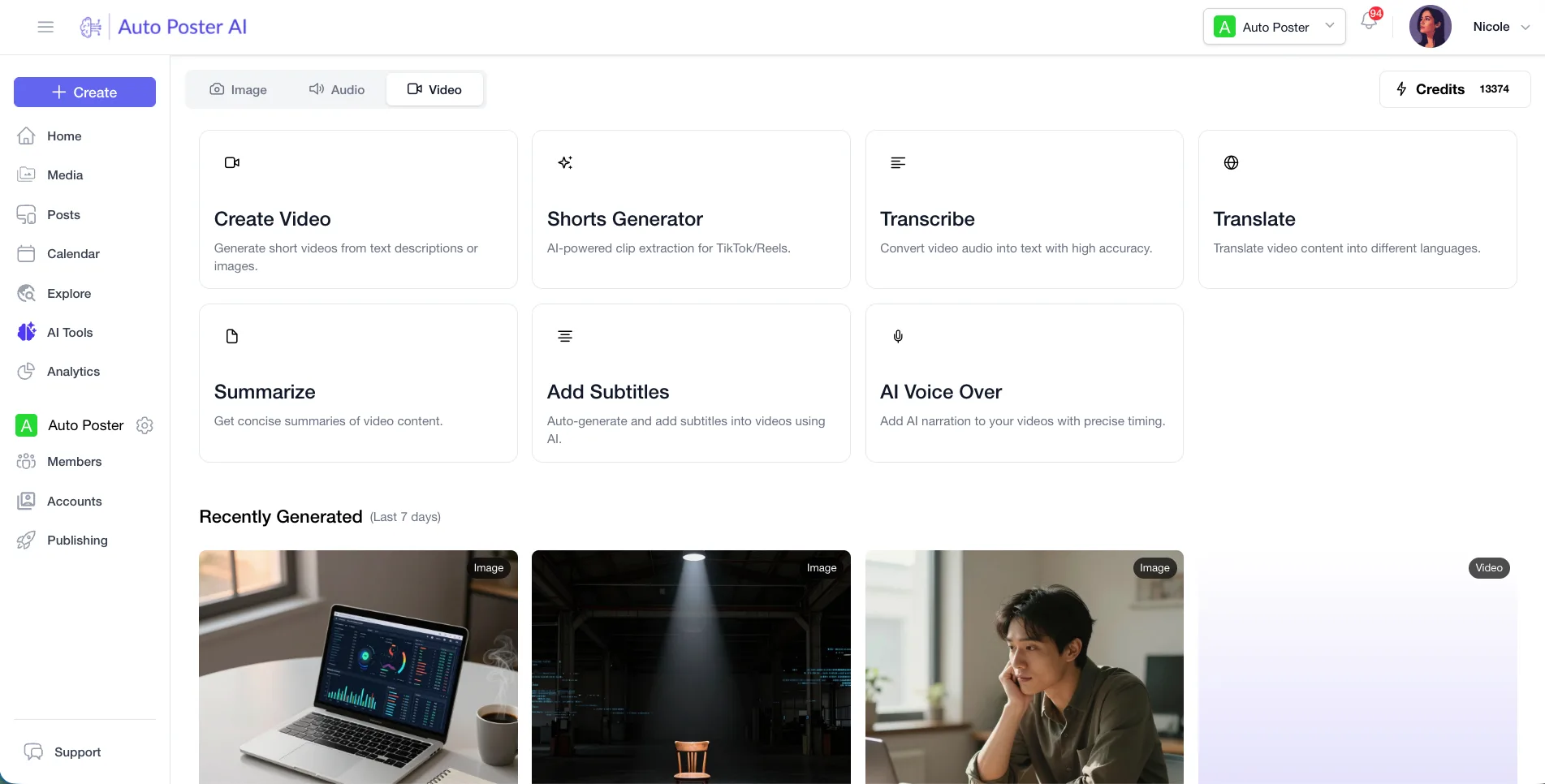
- You want AI voiceover, voice cloning and music generation beside your clip tool, drawn from one credit pool.
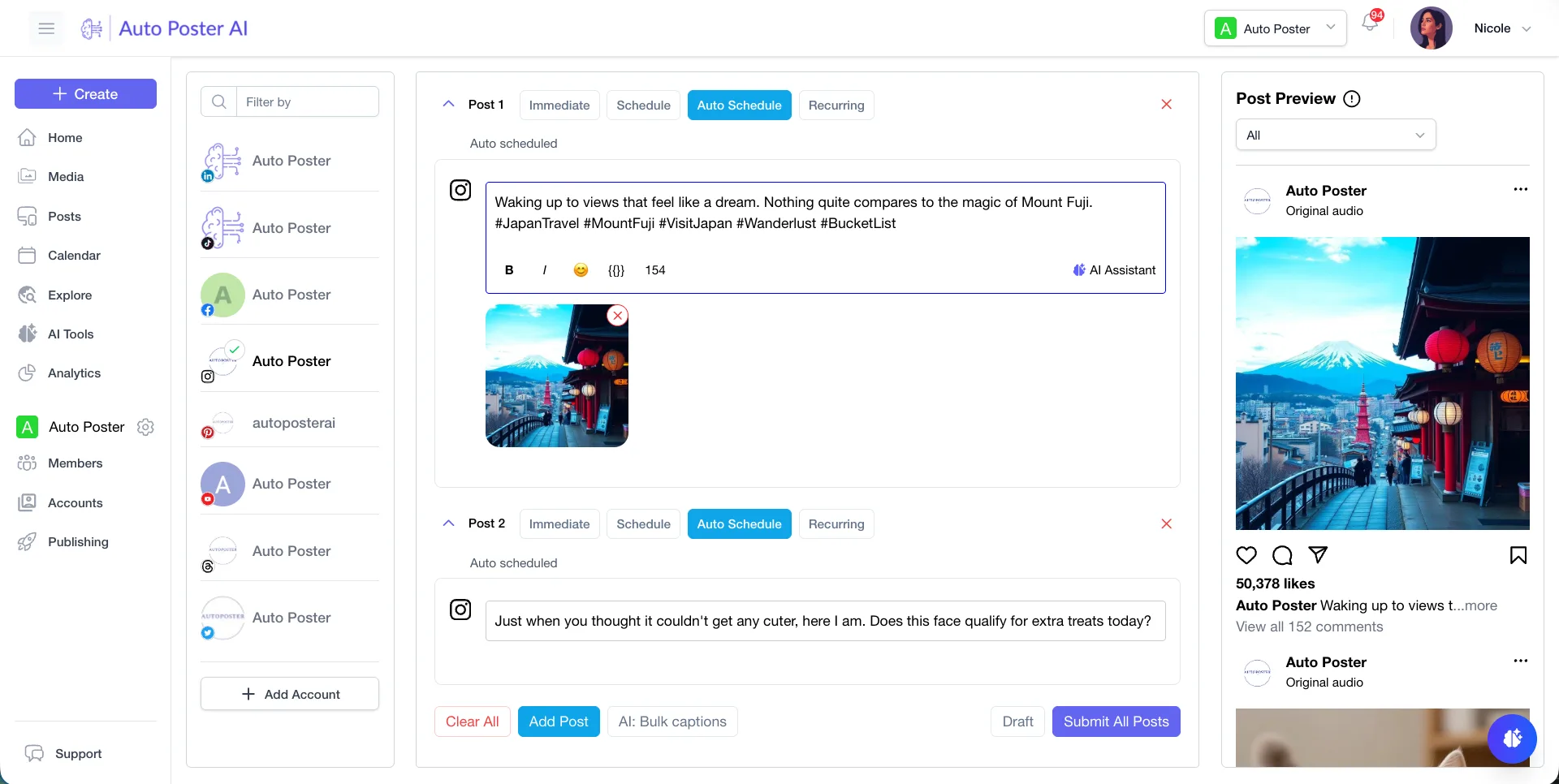
- You publish to X, Bluesky, Mastodon, Telegram, Reddit or Discord and want that scheduling in the same account as your clips.
- You want bulk posting from media folders and autoposting flows after the clips are made.
Stay with Vizard if
- You want to fix a clip by deleting words in a transcript, or fine-tune it on a second-level timeline.
- You need 4K export, since the paid Vizard plans list 4K and we have not confirmed an export resolution for ours.
- You want to pay by minutes of source video, with 1 credit equal to 1 minute.
Vizard in brief
Vizard finds highlights in long recordings, reframes them for vertical video, captions them and lets you refine the result in an editor. Its API comes with Creator and Business, and projects from it show up in the same workspace for editing and publishing.
For a single podcast or webinar, that editor is the draw. The gap shows when your week includes voiceover, thumbnails, music and replying to viewers. AutoPoster AI covers those in one account, though its clip editing is lighter than Vizard's.
Vizard pricing
| Plan | Billed monthly | Billed annually | What you get |
|---|---|---|---|
| Free | $0/mo | Not confirmed | 60 credits a month, 1 social account, 720p export, watermark, 10 minute exports, 3 day storage |
| Creator | Not confirmed | Not confirmed | 6 social accounts, 4K, no watermark, scheduled posts, 100GB storage, API. Price not readable on the live page, 7,200 to 74,400 credits a year across tiers |
| Business | Not confirmed | Not confirmed | 20 social accounts, shared workspace, team members, brand kit, same credit tiers as Creator. Price not readable |
AutoPoster AI vs Vizard
| Feature | AutoPoster AI | Vizard |
|---|---|---|
| Long video to short clips | Professional plan | Yes: core product, with auto reframe |
| Animated subtitles | Professional plan | Yes: also on Free |
| AI captions and hashtags | Professional plan | Yes: social captions and hashtags |
| AI dubbing and voiceover | Professional plan | Not listed: captions translate into 100+ languages, no voice dubbing found |
| AI video generation | Professional plan | Partial: AI B-roll and a video generator in the nav |
| AI image generation | Professional plan | Not listed |
| Voice cloning | Professional plan | Not listed |
| AI music generation | Professional plan | Not listed |
| Multi-platform scheduling | Yes | Partial: scheduled posts on Creator and up, networks not named |
| API | Professional plan | Yes: Creator and Business, uses your upload minutes |
| Team roles and approvals | Brand plan | Partial: team members and shared projects on Business |
| Unified comment inbox | Brand plan | Not listed |
| Analytics and best-time heatmap | Brand plan | Not listed |
"Not listed" means we did not find the feature on Vizard's site on October 31, 2026. It may still exist or may ship later.
AutoPoster AI in practice
Where AutoPoster AI is stronger
Voice and music in the same tool
Text to speech, voice cloning and AI music generation are part of AI Studio. We found none of them in Vizard's published features.
Learn more →Named reach beyond short video apps
Vizard's pages point to TikTok, Instagram and YouTube Shorts. Scheduling here also covers X, Bluesky, Mastodon, Telegram, Reddit and Discord.
Learn more →Replies after publishing
On Brand, comments and DMs land in an inbox and analytics sit beside them. We found no inbox on the Vizard pages we read.
Learn more →Folders that post themselves
Drop finished clips into a media folder and an autoposting flow can queue them, which saves a manual scheduling pass.
Learn more →Where Vizard is stronger
Editing a clip
Vizard lets you trim by deleting transcript text and then adjust on a second-level timeline. AutoPoster AI does not have either.
Higher export quality is stated
Paid Vizard plans list 4K export and uploads up to 600 minutes or 30GB. Free is capped at 720p.
Bigger monthly volume
Vizard's published tiers start well above the free 60 credits and go to 74,400 credits a year, priced as minutes of video.
Brand templates for clips
Built-in and saved brand templates plus a brand kit on Business keep captions consistent across a team.
How to switch from Vizard
- 1
Export your clips before leaving. Free storage lasts only 3 days, and Free exports carry a watermark, so re-render them on a paid plan first.
- 2
If you call the Vizard API from scripts, point those jobs at our API or MCP instead. Vizard's API ran on your upload minutes.
- 3
Heavy users who clip over 10,000 minutes a month are sent to a separate high-volume arrangement, so check volume before you compare costs.
Frequently asked questions
- How does Vizard count usage?
In credits where 1 credit equals 1 minute of video. Free gives 60 a month, and paid plans list yearly credit tiers from 7,200 up to 74,400.
- What is Vizard's price?
Not confirmed. The live pricing page showed $0 placeholders for Creator and Business, so we list no monthly figure.
- Is AutoPoster AI unlimited?
No. AI Studio uses credits, 1000 on Professional at $15 a month or $12.50 billed annually, and 50 on the Free plan.
- Does Vizard schedule posts?
Its pricing lists scheduled social posts from Creator up. It does not name the networks, so confirm yours before switching.
Other alternatives
Sources, checked on October 31, 2026
Pricing and features change, so check Vizard's site before buying. Vizard is a trademark of its owner. AutoPoster AI is not affiliated with it.
Switch from Vizard to AutoPoster AI
Connect your accounts and try it on your own content.
Includes 7 days of Pro access • No credit card required • Seamless downgrade to free plan