
Descript alternative when the edit is done and posting is the bottleneck
Descript is an editor first, with transcript-based editing, avatars and screen recording that we don't have. AutoPoster AI is the pick if you mainly cut clips, add subtitles, dub and then publish across networks from one account.
Choose AutoPoster AI if
- You want finished clips to go straight into a scheduler, with X, Bluesky, Mastodon, Telegram, Reddit and Discord supported.
- You want a flat price per account bundle, not per editor seat.
- You want inbox, DMs, reviews and analytics on Brand after posting.
Stay with Descript if
- You edit by changing the transcript, and you record screens or remote guests.
- You want AI avatars, stock AI speakers and custom voice clones inside an editor.
- You need 1 TB of cloud storage and 4K export on a mid-priced plan.
Descript in brief
Descript treats a recording like a document: delete a sentence from the transcript and the video follows. Add remote recording, stock and cloned voices, avatars and generated media, and it is a strong place to produce a show.
What it leaves open is distribution, since its pages talk about exporting rather than posting. AutoPoster AI starts from the other end: clips, subtitles and dubbing are credit-metered tools feeding a scheduler. Expect less editing control in return.
Descript pricing
| Plan | Billed monthly | Billed annually | What you get |
|---|---|---|---|
| Free | $0/mo | Not confirmed | 1 editor, 60 media minutes a month, 100 AI credits one time, watermark, 720p, 5 GB |
| Hobbyist | $24/mo | $16/mo | Per person. 600 media minutes, 400 AI credits a month, no watermark, 1080p, 100 GB. Annual figure is inferred as the lower price |
| Creator | $35/mo | $24/mo | 1 to 3 seats. 1,800 media minutes, 800 AI credits a month, 4K, 1 TB, batch export |
| Business | $65/mo | $50/mo | Up to 5 seats. 2,400 media minutes, 1,500 AI credits a month, 4K, 2 TB, priority support |
AutoPoster AI vs Descript
| Feature | AutoPoster AI | Descript |
|---|---|---|
| Long video to short clips | Professional plan | Yes: limited on Free |
| Animated subtitles | Professional plan | Yes: dynamic captions unlimited on all plans |
| AI dubbing and voiceover | Professional plan | Yes: audio dubbing in 30 languages |
| Text to speech | Professional plan | Yes: 25+ stock AI speakers, 60+ on Business |
| Voice cloning | Professional plan | Yes: custom clones on paid plans |
| AI image generation | Professional plan | Yes: images generated to fill gaps |
| AI video generation | Professional plan | Yes: video generation and regeneration |
| AI music generation | Professional plan | Yes: music generation listed |
| Multi-platform scheduling | Yes | Not listed: export and reformat, no posting found |
| API | Professional plan | Yes: API listed, plan not stated |
| MCP for Claude, ChatGPT and Cursor | Professional plan | Yes: plan not stated |
| Unified comment inbox | Brand plan | Not listed |
| Analytics and best-time heatmap | Brand plan | Not listed |
"Not listed" means we did not find the feature on Descript's site on October 31, 2026. It may still exist or may ship later.
AutoPoster AI in practice
Where AutoPoster AI is stronger
Publishing without leaving
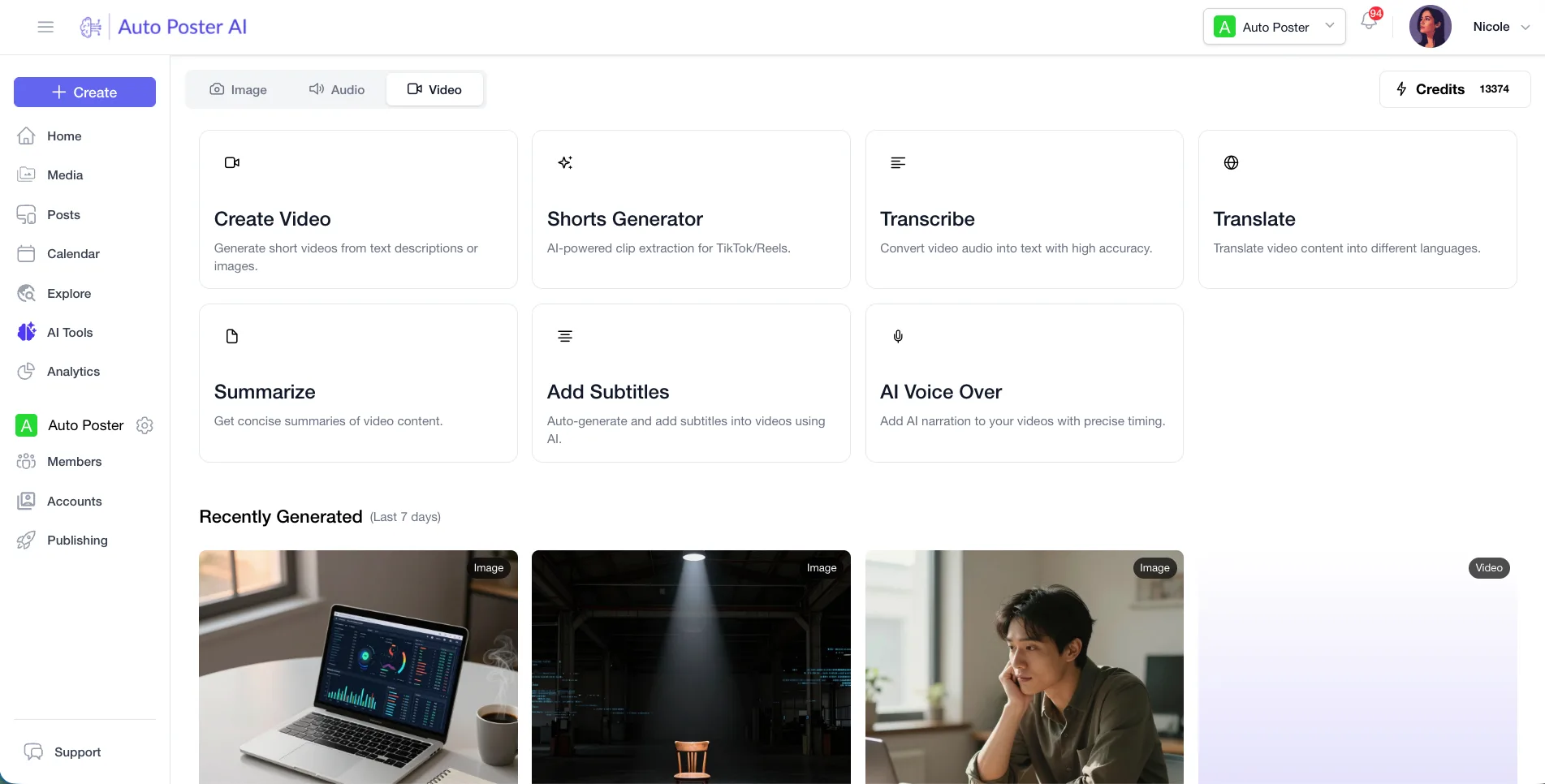
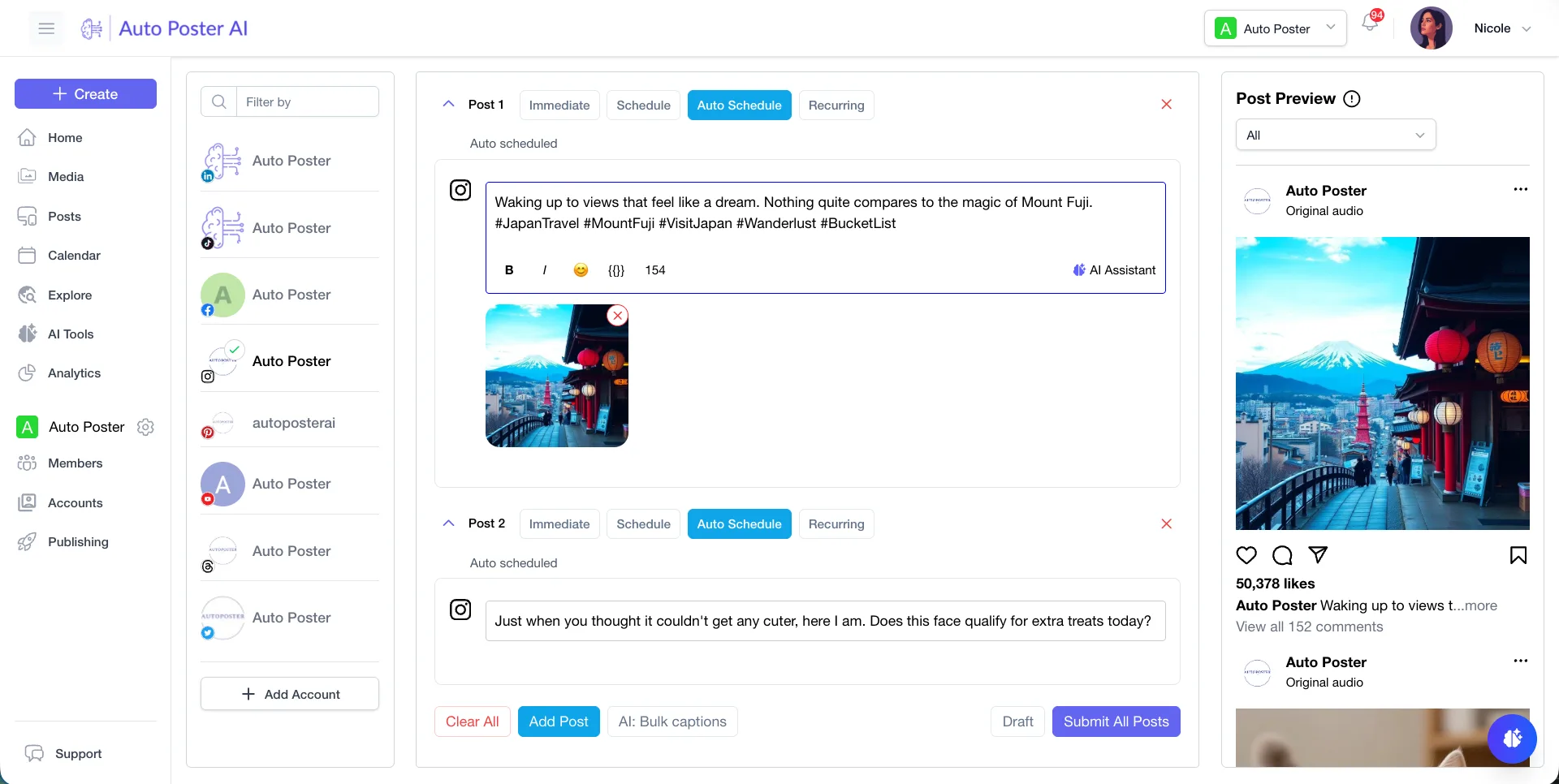
Descript's pages describe exporting for YouTube, TikTok and LinkedIn. We schedule and publish to many networks directly from the clip.
Learn more →Cheaper entry for a small team
Professional is $15 a month, or $12.50 annual, for 5 accounts. Descript's paid plans start at $24 monthly per person.
Learn more →Post-publish tools
Brand adds an inbox, DMs, reviews, WhatsApp, analytics and approvals, none of which we found on Descript.
Learn more →Queue automation
Bulk posting from media folders and autoposting flows keep a calendar full with no manual uploads.
Learn more →Where Descript is stronger
Text-based editing
Descript edits video and audio by editing the transcript. AutoPoster AI has no text-based editor.
Avatars and recording
Paid plans include an avatar gallery and custom avatars, and screen recording is on every plan. We offer neither.
Roomy limits
Creator lists 1,800 media minutes, 4K export and 1 TB of storage per person.
Sharing and collaboration
Unlimited shareable links and pages on all plans, and Business adds priority support with an SLA.
How to switch from Descript
- 1
Export before downgrading, since the Free plan watermarks exports and caps them at 720p.
- 2
Use Descript's own export and reformat for platform sizes to move finished videos, then upload the files to our media library.
- 3
Descript's Free AI credits are a one-time 100, so spend them before leaving, since paid credits renew monthly.
Frequently asked questions
- Which Descript plan removes the watermark?
Hobbyist and above. Free exports are watermarked and limited to 720p.
- Does Descript have a free trial?
The page mentions no separate trial, only the Free plan, which needs no credit card.
- Is Descript's annual price confirmed?
The page does not label the two figures. The lower one is probably annual, since checkout uses yearly billing and annual saves up to 35%.
- Can AutoPoster AI do text-based editing?
No. Pick Descript for that, and use us for clipping, subtitles, dubbing and publishing.
Other alternatives
Sources, checked on October 31, 2026
Pricing and features change, so check Descript's site before buying. Descript is a trademark of its owner. AutoPoster AI is not affiliated with it.
Switch from Descript to AutoPoster AI
Connect your accounts and try it on your own content.
Includes 7 days of Pro access • No credit card required • Seamless downgrade to free plan