
HeyGen alternative only if you don't need avatars: dubbing, clips and subtitles plus publishing
We don't replace HeyGen's main reason to exist. It makes AI avatar videos, and we have no avatars. AutoPoster AI suits a narrower group: people using HeyGen mainly for social clips, subtitles or dubbing, who also want to schedule and manage those posts in one account. Many teams would be better off keeping HeyGen and adding a publishing tool.
Choose AutoPoster AI if
- You don't use avatars and mostly need clips, subtitles and dubbing for social posts.
- You want to schedule and post from the same account that makes the video.
- You manage comments, DMs or WhatsApp broadcasts as well as content.
Stay with HeyGen if
- You need AI avatars or a digital twin of yourself. We can't do this at all.
- You make training, onboarding or long-form presenter video, up to 60 minutes on Business and with LMS and SCORM support.
- You localise video at scale into 175+ languages with voice cloning and lip-sync.
- You want 4K export or team features such as SAML/SSO.
HeyGen in brief
HeyGen is built around presenter video: custom and stock avatars, voice cloning and translation, with Avatar V added this year. It also has a broad tool catalogue that includes clips and subtitles, along with an MCP server. For training, sales and localisation teams it is a far deeper product than ours in this area.
So this isn't a like-for-like swap. We have no avatars and don't aim to. The comparison helps only if you've been using HeyGen for shorter social content, without an avatar, and you're also paying for something else to post it. In that case one account for dubbing, subtitles, clips and scheduling may be simpler. Otherwise, keep HeyGen.
HeyGen pricing
| Plan | Billed monthly | Billed annually | What you get |
|---|---|---|---|
| Free | $0/mo | Not confirmed | 3 watermarked videos a month, up to 1 minute each, 1 custom avatar |
| Creator | $29/mo | $24/mo | 600 credits a month, 1080p, no branding, translation up to 30 minutes |
| Pro | $49/mo | Not confirmed | 1,000 credits a month and up, 4K, videos up to 30 minutes. Yearly offer is 2 months free |
| Business | $149/mo | Not confirmed | 1,500 credits a month, 60-minute videos, 5 custom avatars, SSO, $20 per added seat |
| Enterprise | Not confirmed | Not confirmed | Contact sales. No maximum video length, SCIM, dedicated success manager |
AutoPoster AI vs HeyGen
| Feature | AutoPoster AI | HeyGen |
|---|---|---|
| AI video generation | Professional plan | Yes: avatars, Video Agent and its own video model |
| AI dubbing and voiceover | Professional plan | Yes: 175+ languages, lip-sync on dubbing |
| Voice cloning | Professional plan | Yes: instant and professional clones |
| Text to speech | Professional plan | Yes: up to 10 hours on Creator |
| Animated subtitles | Professional plan | Yes: generate, style and translate |
| Long video to short clips | Professional plan | Yes: long video to short tools |
| AI image generation | Professional plan | Partial: plan lists it on Pro, API has portraits |
| API | Professional plan | Yes: priced separately |
| MCP for Claude, ChatGPT and Cursor | Professional plan | Yes: hosted server, all plans, uses plan credits |
| Multi-platform scheduling | Yes | Not listed |
| Unified comment inbox | Brand plan | Not listed |
| Analytics and best-time heatmap | Brand plan | Not listed |
| Link in bio pages | Yes | Not listed |
"Not listed" means we did not find the feature on HeyGen's site on October 31, 2026. It may still exist or may ship later.
AutoPoster AI in practice
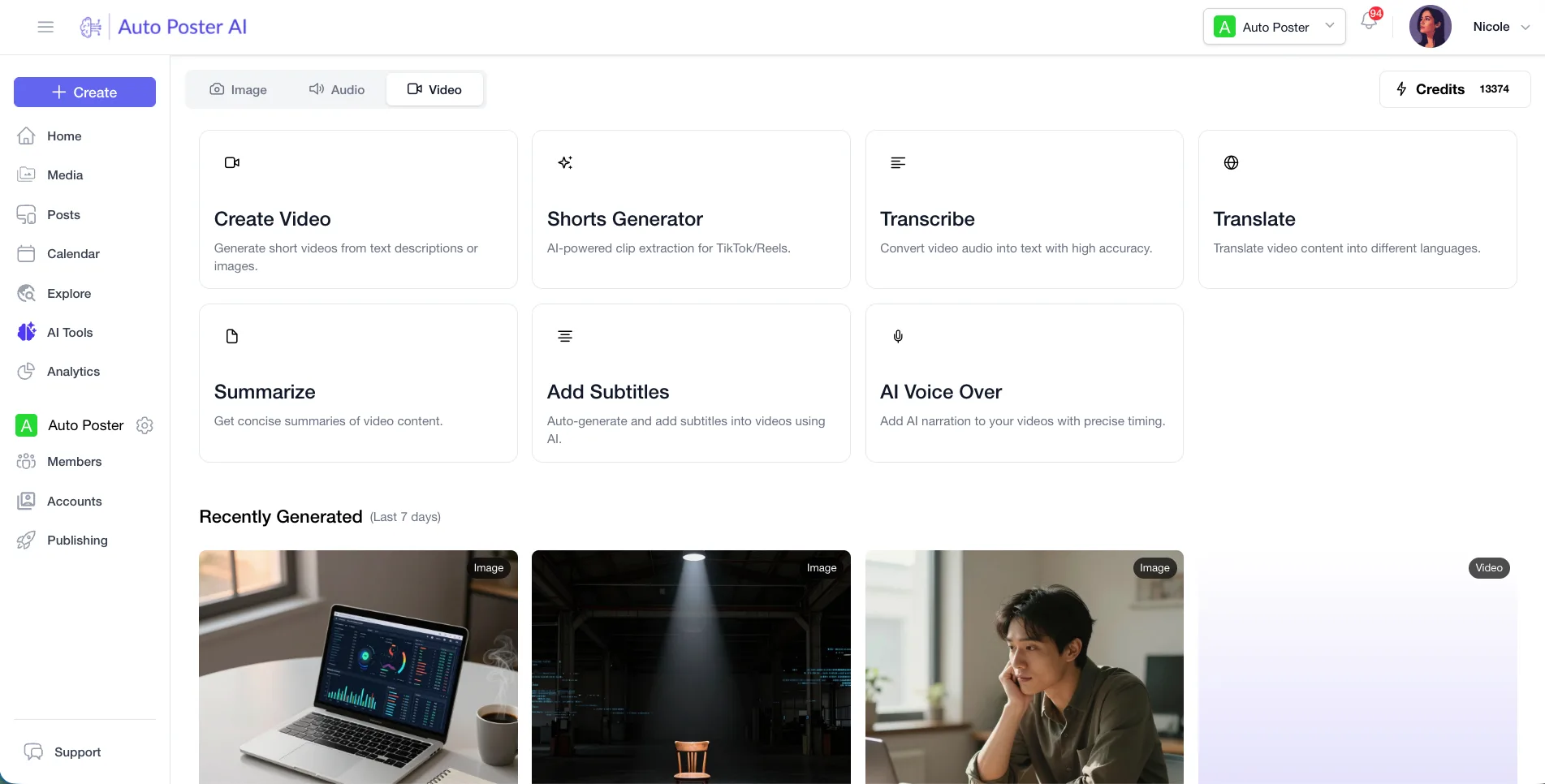
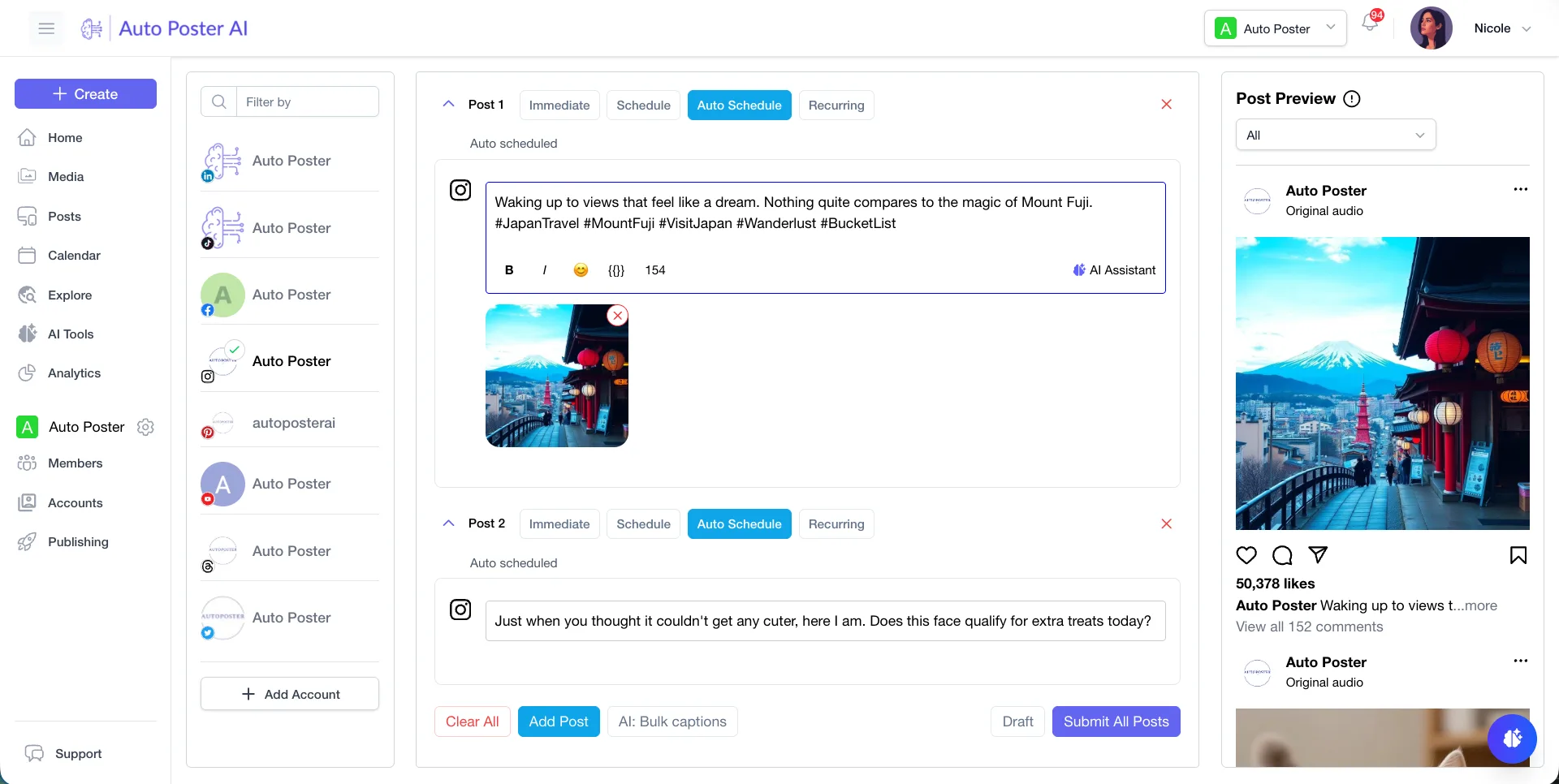
Where AutoPoster AI is stronger
Scheduling built in
HeyGen's pages cover making and sharing video, and we found no social scheduler. Here the video you make and the post that carries it live in one account.
Learn more →The work after posting
Brand adds a comment inbox, DM inbox, comment-to-DM on Facebook and Instagram, WhatsApp broadcasts and analytics.
Learn more →A lower starting price, without avatars
Our paid plans start at $15 a month with 1,000 credits and AI Studio, against $29 for HeyGen Creator. These buy different things, so compare only if avatars aren't the point.
Learn more →Autoposting
Professional includes autoposting flows and bulk posting from media folders, for accounts that post on a regular cadence.
Learn more →Where HeyGen is stronger
AI avatars
Avatar V, announced in April 2026, builds an avatar from a 15-second phone recording and keeps it stable across angles and looks. We have no avatars.
Localisation depth
Dubbing into 175+ languages has precision and speed engines, voice preservation, lip-sync and an audio-only mode.
Long-form and training video
Videos up to 60 minutes on Business, plus SCORM export, LMS integrations and a brand kit. Our tools aren't built for this.
Developer surface
A hosted MCP server works with Claude, Cursor and others on all plans, with tools for avatars, translation, clipping and batch runs.
How to switch from HeyGen
- 1
Download the videos you want to reuse. Rendered videos stay saved under Projects after cancelling, so this isn't urgent unless you plan to delete the account, which removes all associated data.
- 2
Use your credits before the cycle ends, as unused ones expire and don't roll over after cancelling. Pausing also expires your balance.
- 3
Decide on avatars before you leave. You drop to 1 avatar slot on Free, and extra avatars are locked until you resubscribe. They can't move to us, as we have no avatar feature.
- 4
To cancel on desktop, go to Settings, Plan and Billing, Manage Billing, then Cancel Plan. App store purchases are cancelled through Apple or Google. Access runs to the end of the cycle, and unused time isn't refunded.
Frequently asked questions
- Does AutoPoster AI have AI avatars like HeyGen?
No. If avatars are why you use HeyGen, we aren't a replacement. You could keep it to make video and use a publishing tool alongside it.
- Does HeyGen have a free plan?
Yes. It allows 3 watermarked videos a month of up to 1 minute each, with 1 custom video avatar.
- Can I schedule social posts from HeyGen?
We didn't find a social scheduler on its pricing or tools pages. Its site describes sharing and downloading finished videos.
- What does HeyGen cost per year?
Its FAQ puts Creator at $24 a month on yearly billing, and the toggle advertises 2 months free. We couldn't read yearly figures for Pro and Business, so check its pricing page.
Other alternatives
Sources, checked on October 31, 2026
- https://www.heygen.com/pricing
- https://www.heygen.com/translate/ai-dubbing
- https://developers.heygen.com/docs/quick-start
- https://www.heygen.com/tool
- https://developers.heygen.com/mcp/overview
- https://www.heygen.com/
- https://www.heygen.com/blog/announcing-avatar-v
- https://help.heygen.com/en/articles/8304328-how-to-cancel-or-pause-your-heygen-subscription
Pricing and features change, so check HeyGen's site before buying. HeyGen is a trademark of its owner. AutoPoster AI is not affiliated with it.
Switch from HeyGen to AutoPoster AI
Connect your accounts and try it on your own content.
Includes 7 days of Pro access • No credit card required • Seamless downgrade to free plan