
Captions alternative when the edit is only half the job and you also need to publish
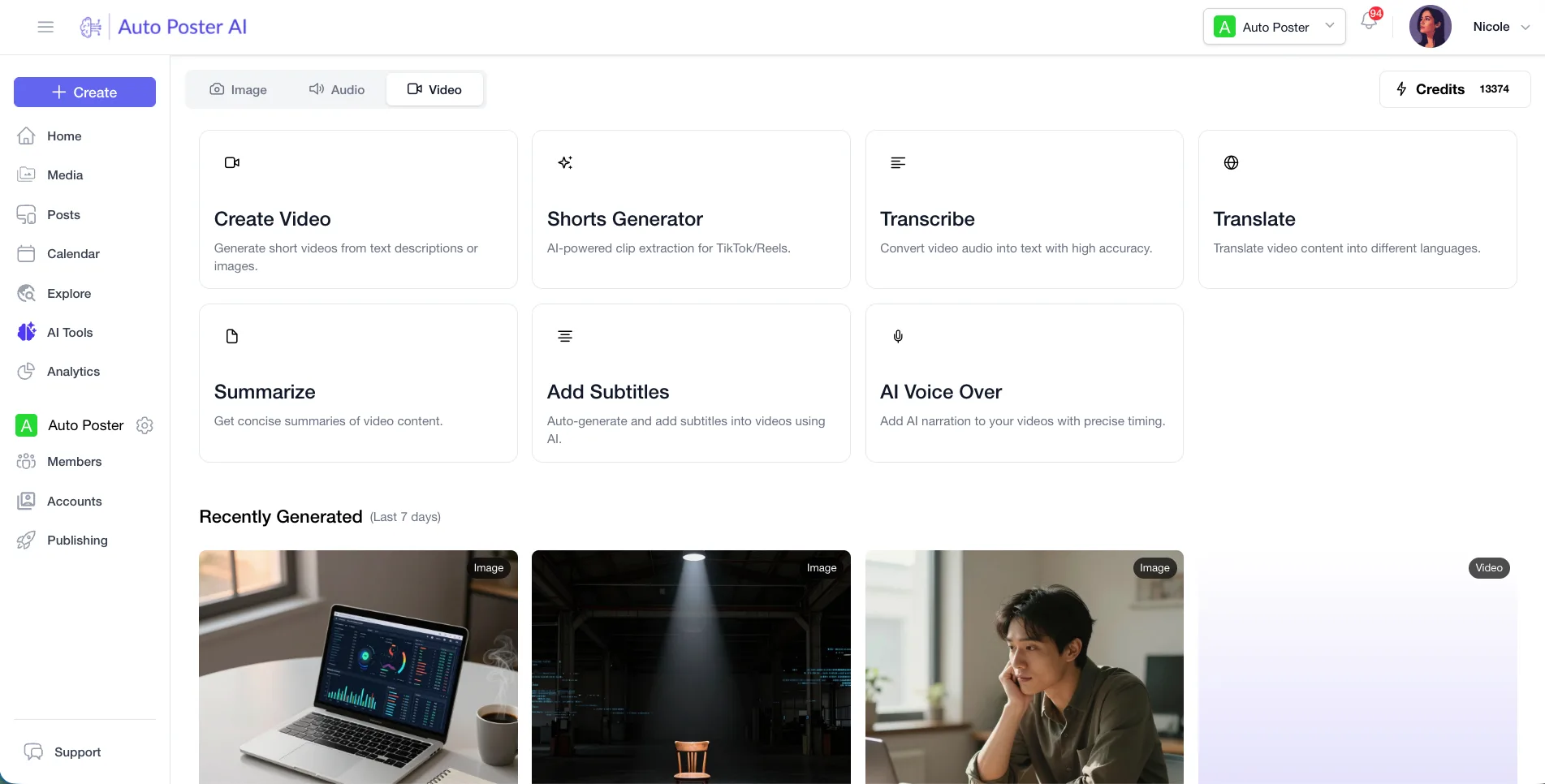
Captions is a dedicated AI video editor with AI twins, a chat-based editor and a style library, and for editing depth it goes further than we do. We don't offer avatars at all. AutoPoster AI suits people who want clips, subtitles and dubbing in the same account they schedule from, because we found no posting or scheduling on the Captions site.
Choose AutoPoster AI if
- You finish videos in one app and then post them from another, and you'd like one account for both.
- You want autoposting flows and bulk posting from media folders next to your AI video tools.
- You run a team that needs approvals, a comment inbox and analytics after the video is live.
Stay with Captions if
- You want an AI twin or AI actors. We don't offer avatars, so we can't replace this.
- Editing quality is the priority, with AI Edit styles, eye contact correction and a chat-based editor.
- You like a phone-first workflow and export finished videos to post by hand.
Captions in brief
Despite the name, Captions covers much more than captions: AI Edit, AI twins, translated subtitles and clean-up tools, and it has merged with Mirage Studio. Plans run on monthly credits, starting at $9.99 for Basic in its docs, with Max at $24.99 unlocking twins and clips. If you edit on-camera footage every day, this depth is the reason to pay.
The gap we see is after the export. Its export flow downloads a file, and we found no scheduler, inbox or analytics on its site, so you'd still need another product to post and follow up. AutoPoster AI covers that second half and gives you lighter video tools alongside it, with no avatars. If your workflow is mostly simple clips and subtitles, that bundle may be enough. If it depends on AI Edit or a twin, it won't be.
Captions pricing
| Plan | Billed monthly | Billed annually | What you get |
|---|---|---|---|
| Free | $0/mo | Not confirmed | 60 to 200 one-time credits, basic editing, 1 caption template |
| Basic | $9.99/mo | Not confirmed | 200 credits a month. In the help docs, not on the pricing page |
| Max | $24.99/mo | Not confirmed | 500 credits a month, AI twins, chat editor, long video to clips. Pricing page shows iOS prices |
| Frontier | $69.99/mo | Not confirmed | 1,400 credits a month, newest models. 2x is $139.99 and 4x is $279.99 |
| Enterprise | Not confirmed | Not confirmed | Custom. Bulk credit discounts, custom seats, account team |
AutoPoster AI vs Captions
| Feature | AutoPoster AI | Captions |
|---|---|---|
| Animated subtitles | Professional plan | Yes: core product, 100+ templates on Max |
| Long video to short clips | Professional plan | Yes: listed from Max up |
| AI dubbing and voiceover | Professional plan | Yes: AI dubbing listed for iOS and desktop, not web |
| AI video generation | Professional plan | Yes: prompt to video, 16 credits per 6 seconds |
| AI image generation | Professional plan | Yes: 1 to 3 credits, higher on some models |
| AI music generation | Professional plan | Yes: 1 to 2 credits |
| API | Professional plan | Yes: Mirage API with key access |
| MCP for Claude, ChatGPT and Cursor | Professional plan | Not listed |
| Multi-platform scheduling | Yes | Not listed: no page in the help index, homepage covers creation |
| Unified comment inbox | Brand plan | Not listed |
| Analytics and best-time heatmap | Brand plan | Not listed |
| Link in bio pages | Yes | Not listed |
"Not listed" means we did not find the feature on Captions's site on October 31, 2026. It may still exist or may ship later.
AutoPoster AI in practice
Where AutoPoster AI is stronger
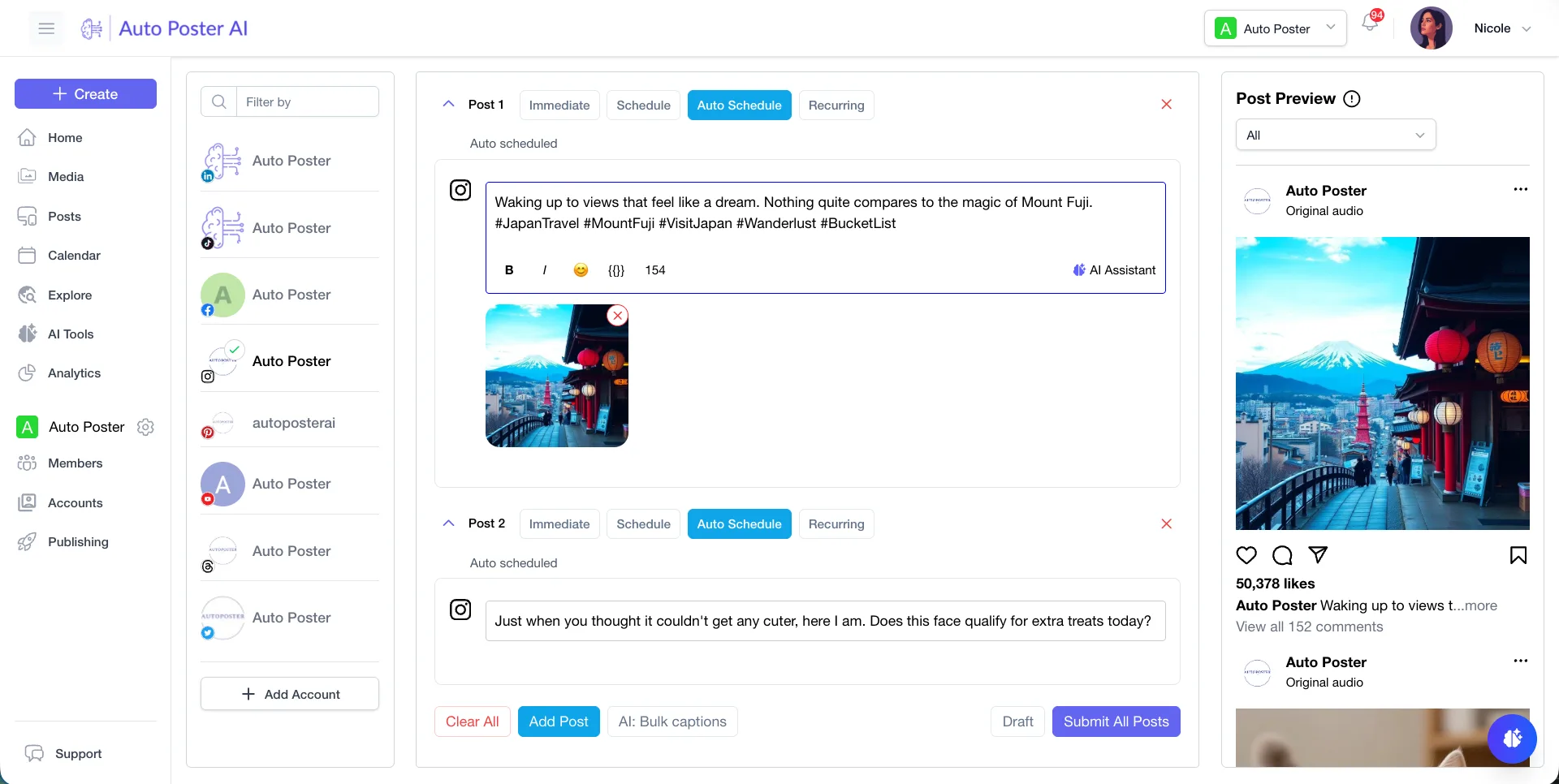
Publishing in the same place
Schedule what you make from the account you made it in. The Captions export flow ends with the file downloading to your device.
Learn more →Work after the video is live
Brand adds a comment inbox, DM inbox and analytics, and Business adds AI replies and moderation. We found none of these on the Captions site.
Learn more →Repeatable posting
Professional includes bulk posting from media folders and autoposting flows, which suit a steady content schedule.
Learn more →Agent access
API and MCP are included from Professional at $15 a month, so an AI agent can work with your account. Captions documents an API, and we didn't find MCP.
Learn more →Where Captions is stronger
AI twins and actors
Max includes digital twins and custom AI actors, up to 30 twins by its plan notes. We have no avatar feature.
AI Edit
It cuts scenes, overlays B-roll and applies a chosen style across a whole video, from a library of curated styles. Our tools don't work at that level of editing.
Footage clean-up
Eye contact correction, denoise and trimming of pauses and filler words sit in one editor, with a chat-based editor for changes.
Credit rollover
Unused credits carry over on Basic and up, to a cap of 3 times your monthly allowance, so a slow month isn't wasted.
How to switch from Captions
- 1
Download projects from each device you use. Captions stores projects locally and says project syncing is not yet available, so logging out or changing device can lose access.
- 2
Export while you're still subscribed. AI Edit, caption styles, eye contact correction and background music need a paid plan to export, and an SRT caption file is an advanced option.
- 3
Use your credits first. If you cancel mid-period they last until the period ends and are then forfeited.
- 4
Cancel from your profile page at least 24 hours before renewal. Web monthly plans are non-refundable, and store purchases are refunded by Apple or Google. We didn't find step-by-step cancel instructions per platform.
Frequently asked questions
- Is Captions the same company as Mirage?
Its homepage says Mirage Studio was merged with Captions. The footer names NOCAP, Inc. doing business as Captions, and its API runs on mirage.app.
- Do Captions credits get used if I don't export?
Yes. Its docs say credits are used whether or not you export or save the project, and you can't buy credits individually on standard plans.
- Can AutoPoster AI replace my Captions AI twin?
No. We don't offer avatars or AI twins. If your videos rely on one, keep Captions and consider whether a separate publishing tool is what you need.
- How much do Captions yearly plans cost?
Its help docs mention an automatic yearly discount but list no figure, and its pricing page notes that prices shown reflect iOS plans. Check checkout for your price.
Other alternatives
Sources, checked on October 31, 2026
- https://www.captions.ai/help/docs/subscriptions
- https://www.captions.ai/pricing
- https://www.captions.ai/help/docs/feature-availability
- https://www.captions.ai/help/docs/ai-usage
- https://www.captions.ai/help/api-reference
- https://captions.ai/help/llms.txt
- https://www.captions.ai/
- https://www.captions.ai/help/docs/settings/managing-projects
- https://www.captions.ai/help/docs/settings/export
- https://www.captions.ai/help/docs/manage-my-subscription
Pricing and features change, so check Captions's site before buying. Captions is a trademark of its owner. AutoPoster AI is not affiliated with it.
Switch from Captions to AutoPoster AI
Connect your accounts and try it on your own content.
Includes 7 days of Pro access • No credit card required • Seamless downgrade to free plan