
CapCut alternative when the edit is done and publishing is the bottleneck
CapCut is a real editor, with a timeline, effects, templates and background removal, and AutoPoster AI is not. We suit creators who finish the edit elsewhere or want quick AI clips and subtitles, then want to schedule across many networks.
Choose AutoPoster AI if
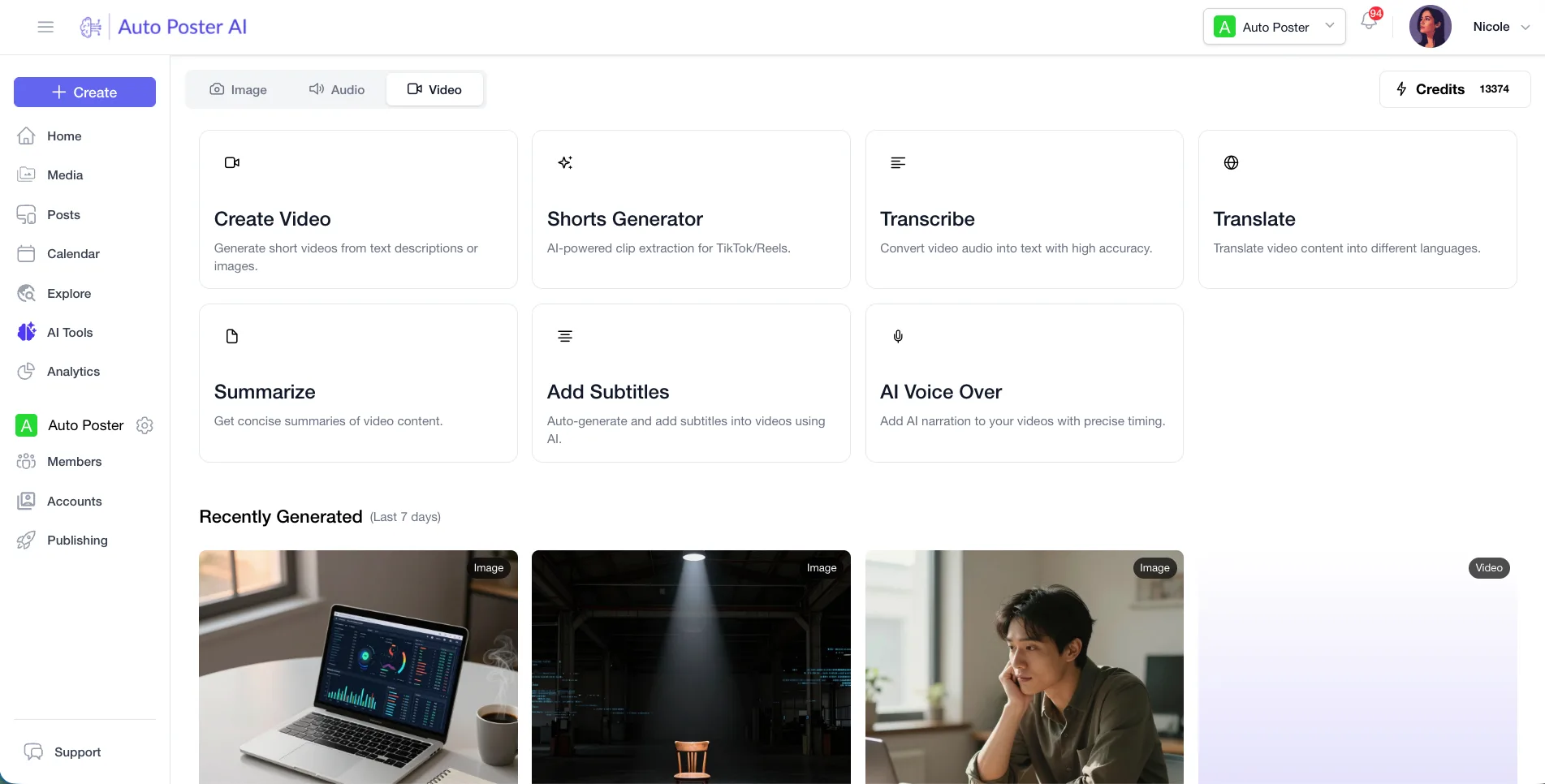
- You want clips, subtitles and dubbing generated for you, then scheduled to many networks.
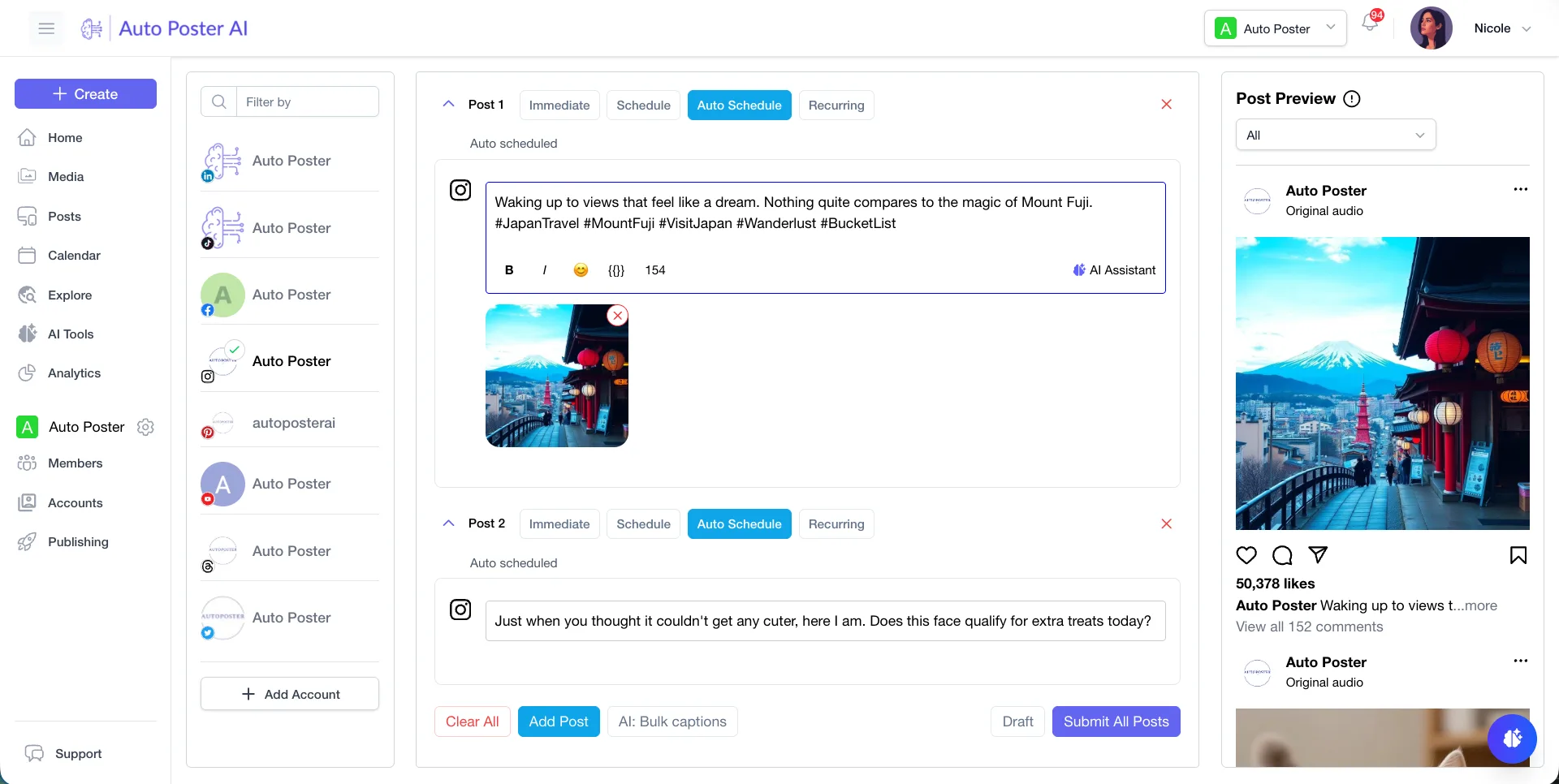
- You post to more than TikTok and want one calendar, bulk posting from folders and autoposting.
- You want a comment inbox, analytics or approvals once posts are live.
Stay with CapCut if
- You want hands-on editing with a timeline, cuts, transitions and effects.
- You rely on templates, background removal or voice clean-up in the editor.
- You want to try a Pro editor free for 7 days without a credit card.
- You make short videos on your phone and edit there.
CapCut in brief
CapCut is an all-purpose editor on desktop, web and mobile, with auto captions, templates and AI generation. Its plans are Free, Pro, Ultra and a per-seat Teams tier, with monthly AI credits that fund video generation.
Do not read this as an editor comparison. If you edit by hand, CapCut wins. The case for us is the step after export: getting posts to many networks on a schedule and handling the replies. The credit and price figures above come from a page showing yen and saying final pricing appears after sign-in, so confirm them in your region.
CapCut pricing
| Plan | Billed monthly | Billed annually | What you get |
|---|---|---|---|
| Free | $0/mo | $0/mo | Free templates and basic editing tools, no numeric limits stated |
| Pro | Not confirmed | Not confirmed | 1 TB cloud storage, 800 AI credits a month. Page showed JPY 2,700 monthly or 21,800 yearly, USD price not confirmed |
| Ultra | Not confirmed | Not confirmed | 1 TB storage, 13,821 AI credits a month. Page showed JPY 12,600 monthly or 144,800 yearly |
| Teams | Not confirmed | Not confirmed | Per seat, from 2 seats, 800 credits each. Page showed JPY 1,295 per seat monthly |
AutoPoster AI vs CapCut
| Feature | AutoPoster AI | CapCut |
|---|---|---|
| Animated subtitles | Professional plan | Yes: auto captions in multiple languages |
| AI video generation | Professional plan | Yes: text, image and keyframe to video; Seedance models on Pro |
| AI image generation | Professional plan | Yes: listed as AI design and image generation |
| Text to speech | Professional plan | Yes |
| Mobile apps | Yes | Yes: desktop, online, mobile and CapCut Pad |
| Team roles and approvals | Brand plan | Partial: Teams plan with seats, approvals not described |
| Voice cloning | Professional plan | Not listed |
| AI dubbing and voiceover | Professional plan | Not listed |
| Long video to short clips | Professional plan | Not listed |
| Multi-platform scheduling | Yes | Not listed: a CapCut guide on TikTok scheduling exists but its steps were unclear |
| API | Professional plan | Not listed |
| Unified comment inbox | Brand plan | Not listed |
| Link in bio pages | Yes | Not listed |
"Not listed" means we did not find the feature on CapCut's site on October 31, 2026. It may still exist or may ship later.
AutoPoster AI in practice
Where AutoPoster AI is stronger
Many networks, one calendar
We connect X, Bluesky, Mastodon, Telegram, Reddit, Discord, Instagram, TikTok, LinkedIn, Facebook, YouTube, Pinterest and Threads. CapCut's own pages we read only link to its TikTok and YouTube accounts.
Learn more →Long video to clips, automatically
AI Studio turns a long video into short clips with animated subtitles, rather than leaving the cutting to you.
Learn more →After the post goes live
Brand adds a comment inbox, DMs and analytics with a best-time heatmap. We found none of that in CapCut's listed features.
Learn more →Where CapCut is stronger
A real editor
Cutting, trimming, transitions, subtitles, noise removal and video conversion are listed. We offer none of a timeline's control.
Background removal
Listed among CapCut's editing tools. We do not offer background removal.
Templates
Ready-made designs for Reels, TikTok and business content speed up repeat formats.
Free tier and trial
You can try it online free with no card, and new users can start a 7-day Pro trial without a credit card, depending on region.
How to switch from CapCut
- 1
Export finished videos from the editor before cancelling Pro. The pricing page lists no export resolutions per plan, so test a render at the quality you need.
- 2
We found no official help-center article on exporting projects or what happens to cloud storage after cancellation. Download anything you keep in the 1 TB cloud space first.
- 3
Upload your exported files to AutoPoster AI's media library, then schedule or build autoposting flows from the folder.
Frequently asked questions
- Can AutoPoster AI replace CapCut?
No, if you edit by hand. We have no timeline editor. We generate clips, subtitles, dubbing and images, then publish.
- How much is CapCut Pro?
The pricing page we read showed Japanese yen prices only (JPY 2,700 monthly) and told users to sign in for final pricing. We could not confirm a USD price.
- Does CapCut schedule posts?
Its main pages do not list scheduling. A resource guide describes a TikTok schedule option, but we could not verify the steps.
- Can I use both?
Yes. Edit in CapCut, upload the export, and use AutoPoster AI for scheduling, bulk posting and replies.
Other alternatives
Sources, checked on October 31, 2026
Pricing and features change, so check CapCut's site before buying. CapCut is a trademark of its owner. AutoPoster AI is not affiliated with it.
Switch from CapCut to AutoPoster AI
Connect your accounts and try it on your own content.
Includes 7 days of Pro access • No credit card required • Seamless downgrade to free plan