
Buffer alternative: flat plans and an AI video studio, instead of paying per channel
Buffer is a capable scheduler with a generous free plan and its own MCP server. Its AI assistant is text-only on the pages we checked, and cost scales with every channel. AutoPoster AI suits you better if you want video tools and publishing on one flat plan.
Choose AutoPoster AI if
- You manage 5 or more channels and want a flat price rather than a per-channel bill.
- You make short video and want clips, subtitles and dubbing next to your scheduler.
- You need a DM inbox, comment-to-DM rules or WhatsApp broadcasts, which we did not find on Buffer's site.
- You reply to Google Business, Facebook, App Store and Google Play reviews from one inbox.
Stay with Buffer if
- You need 2 or 3 free channels. Buffer's free plan covers 3, and ours covers 1.
- You want API access on a free plan.
- You need many users. Buffer's Team plan includes unlimited users, and our Business plan caps at 15.
Buffer in brief
Buffer charges by channel. That keeps a single-channel account cheap, and it means the bill rises each time you add a network or client. Its pricing page lists 5 channels at $25 a month on yearly billing, and 10 at $50.
Recent releases show active development: real-time notes and mentions, mixed image and video posts, and Substack Notes all shipped in the past two months. If you only need text and image scheduling for a few channels, there is little reason to move.
The gap appears when your work starts with video. Buffer's assistant helps with writing, so you still need separate tools to cut clips, add subtitles or dub, and the bill for those sits on top of your per-channel cost.
Buffer pricing
| Plan | Billed monthly | Billed annually | What you get |
|---|---|---|---|
| Free | $0/mo | $0/mo | Up to 3 channels, 1 user, 10 scheduled posts per channel, 30 days of insights |
| Essentials | $6/mo | $5/mo | Per channel. 1 user, first comment, advanced analytics, 3 API keys |
| Team | $12/mo | $10/mo | Per channel. Unlimited users, approval workflows, branded reports |
| Accounts | AutoPoster AI | Buffer |
|---|---|---|
| 5 | $12.5/mo (Professional) | $25/mo Essentials, 1 user |
| 10 | $20/mo (Brand) | $50/mo Essentials, 1 user |
AutoPoster AI vs Buffer
| Feature | AutoPoster AI | Buffer |
|---|---|---|
| Reviews: Google Business, Facebook, App Store, Google Play | Brand plan | Not listed: Google Business Profile comments are listed, reviews are not mentioned |
| Multi-platform scheduling | Yes | Yes: some formats send a reminder instead |
| First comment scheduling | Yes | Yes: paid plans, not available in CSV upload |
| Bulk posting from media folders | Professional plan | Partial: CSV upload, text and single image only |
| AI autoposting flows | Professional plan | Not listed: Zapier and n8n integrations are listed |
| AI captions and hashtags | Professional plan | Yes: on all plans |
| AI image generation | Professional plan | Not listed |
| Long video to short clips | Professional plan | Not listed |
| Animated subtitles | Professional plan | Not listed |
| AI dubbing and voiceover | Professional plan | Not listed |
| Unified comment inbox | Brand plan | Yes: comments across 10 networks |
| AI comment moderation | Business plan | Not listed: filters and notifications are listed |
| AI replies from your knowledge base | Business plan | Yes: 5 suggestions a week on Free, unlimited on paid |
| DM inbox | Brand plan | Not listed |
| WhatsApp inbox, templates and broadcasts | Brand plan | Not listed |
| Analytics and best-time heatmap | Brand plan | Yes: 30 days on Free |
| Team roles and approvals | Brand plan | Yes: Team plan |
| Link in bio pages | Yes | Yes: Start Page counts as a channel |
| API | Professional plan | Yes: on all plans |
| MCP for Claude, ChatGPT and Cursor | Professional plan | Yes: Claude, ChatGPT, Cursor, n8n |
"Not listed" means we did not find the feature on Buffer's site on October 31, 2026. It may still exist or may ship later.
AutoPoster AI in practice
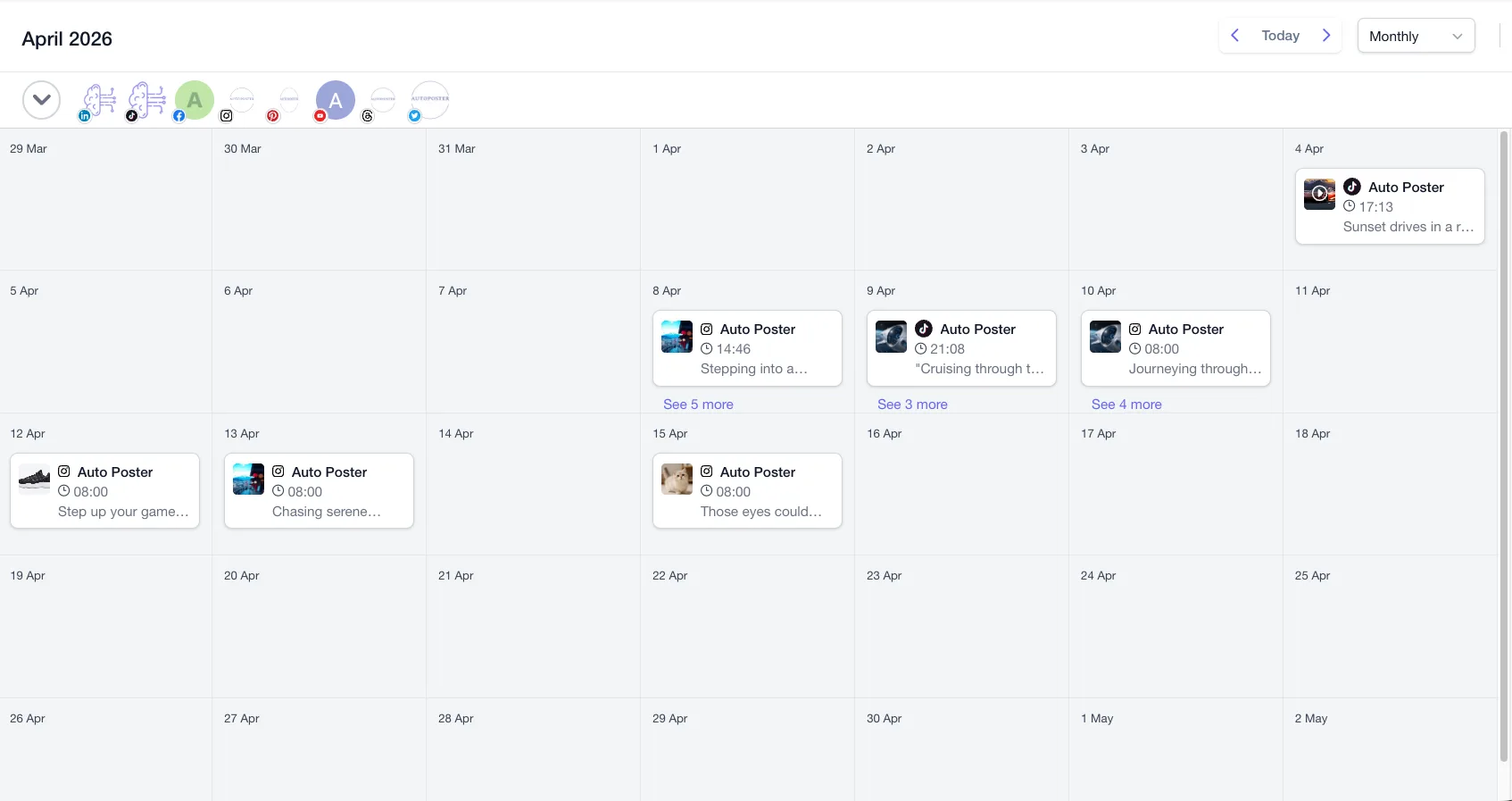
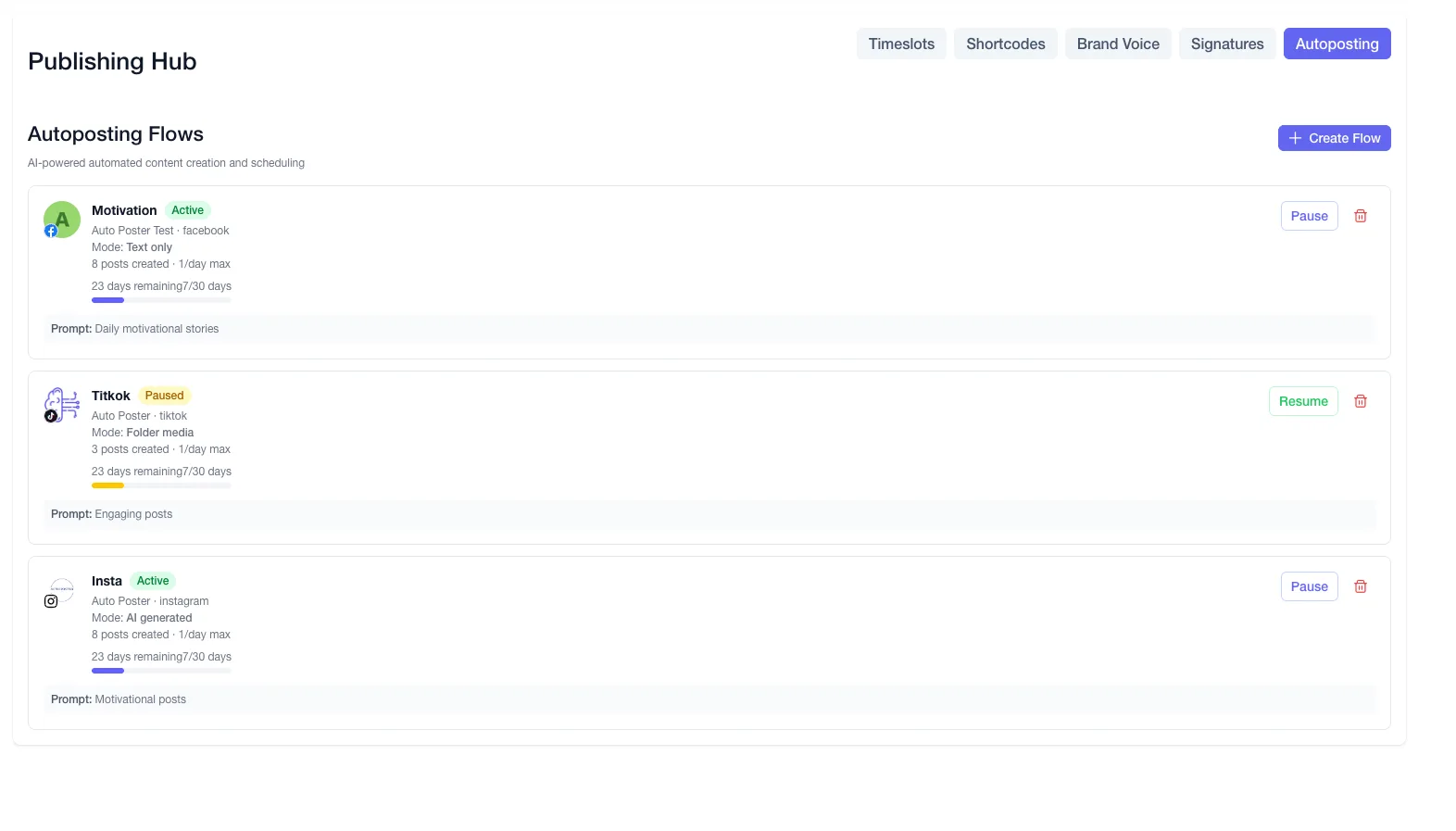
Where AutoPoster AI is stronger
Cost stays flat as channels grow
Ten channels on Buffer Essentials are $50 a month on yearly billing, for one user. AutoPoster AI Brand is $20 a month on yearly billing and includes 10 accounts and 5 team members.
Learn more →Video work happens before scheduling
Turn a long recording into clips, add animated subtitles or dub it, then schedule the result from the same account. Buffer's AI Assistant page describes text only.
Learn more →Bulk posting handles video
Buffer's CSV upload takes text and single images, not video, Reels or carousels. AutoPoster AI builds posts from a media folder and writes captions for each file.
Learn more →Conversations go beyond comments
Brand adds a DM inbox, keyword comment-to-DM rules on Facebook and Instagram, and WhatsApp broadcasts. Business adds AI moderation and replies from your knowledge base.
Learn more →Where Buffer is stronger
A better free plan
Three channels, an inbox, an AI assistant and an API key at no cost. Our free plan has one account and 50 AI credits.
Unlimited users on Team
Team plan users are unlimited. Our Business plan has a limit of 15, so large teams may fit Buffer better.
API and MCP from the free tier
Buffer offers an API key and MCP setups for Claude, ChatGPT, Cursor and n8n on Free. Our API and MCP start on Professional.
Volume rates at high channel counts
On monthly Essentials, channels above 50 drop to $1 each, which can undercut flat plans at very high volume.
How to switch from Buffer
- 1
Note what is scheduled. Buffer states it does not support exporting scheduled posts directly and suggests Zapier into Google Calendar or Sheets, so capture your queue that way or copy the posts you want to keep.
- 2
Export your insights as CSV, Markdown or PDF. These exports are on paid Buffer plans, so do it before your plan ends.
- 3
Connect your accounts in AutoPoster AI and recreate your queue. Keep Buffer running until the first week of posts has published.
- 4
Cancel Buffer. Your plan runs to the end of the period, then moves to Free, and channels above 3 are locked but stay connected.
Frequently asked questions
- How much does Buffer cost for 10 accounts?
On Essentials it is $60 a month on monthly billing or $50 a month on yearly billing. On Team it is $120 or $100. AutoPoster AI Brand covers 10 accounts at $24 monthly or $20 a month on yearly billing.
- Can I export scheduled posts from Buffer?
Not directly. Buffer's documented workaround is Zapier into Google Calendar or Google Sheets.
- Is Buffer's free plan better than AutoPoster AI's?
For several accounts, yes. Buffer Free covers 3 channels with 10 scheduled posts each. AutoPoster AI Free covers 1 account and includes 50 AI credits.
- Do both have MCP?
Yes. Buffer includes it on all plans with shared API limits. AutoPoster AI includes API and MCP access from Professional.
Other alternatives
Sources, checked on October 31, 2026
- https://buffer.com/pricing
- https://buffer.com/pricing.md
- https://buffer.com/community
- https://buffer.com/publish
- https://support.buffer.com/en-us/articles/how-to-upload-posts-in-bulk-to-buffer-cTIhl4mv6H
- https://buffer.com/ai-assistant
- https://support.buffer.com/en-us/articles/what-is-buffers-api-GtIYIQilz5
- https://support.buffer.com/en-us/articles/how-to-use-buffers-calendar-feature-FSSKbH32DN
- https://support.buffer.com/en-us/articles/using-insights-in-buffer-x4gLauQU5a
- https://support.buffer.com/en-us/articles/how-to-cancel-your-subscription-or-delete-your-account-r8sTTNZuVW
Pricing and features change, so check Buffer's site before buying. Buffer is a trademark of its owner. AutoPoster AI is not affiliated with it.
Switch from Buffer to AutoPoster AI
Connect your accounts and try it on your own content.
Includes 7 days of Pro access • No credit card required • Seamless downgrade to free plan