
VEED alternative if you want to publish what you caption, not just edit it
VEED is a full online editor, so it beats us on editing depth, avatars and screen recording. AutoPoster AI is for creators who mostly clip, caption, dub and then schedule across networks. We could not read VEED's current prices, so costs below are unconfirmed.
Choose AutoPoster AI if
- Most of your work is clipping, captioning and dubbing, followed by posting to many networks on a schedule.
- You want image generation, voice cloning and AI music in the same credit pool.
- You want to run folder-based autoposting, or drive posting from Claude through MCP.
Stay with VEED if
- You need a real editor with layers, effects and screen recording in the browser.
- You want AI avatars, including a clone of yourself, or text-to-video from third-party models.
- You work in a team and are happy to pay per editor seat.
VEED in brief
VEED runs in the browser and covers a lot: subtitles, translation, a clip generator, avatars, a screen recorder and generated video from outside models. Billing is per seat, and AI use draws on an allowance that resets rather than rolls over.
If your output is a polished edit, that breadth wins. If your week is clip, caption, dub and post, you spend the saved time on exporting and uploading, which is where AutoPoster AI is built to help, with lighter editing.
VEED pricing
| Plan | Billed monthly | Billed annually | What you get |
|---|---|---|---|
| Free | $0/mo | Not confirmed | Start for free. Limits and watermark not confirmed on the pricing page |
| Paid plans | Not confirmed | Not confirmed | Per-seat billing, monthly or annual AI credits that do not carry over, unlimited subtitles up to 50 hours a month. A VEED subtitle page says Creator starts at $20 a month, but the pricing page lists no prices |
| Enterprise | Not confirmed | Not confirmed | Free trials are for enterprise teams of 3 or more, via sales |
AutoPoster AI vs VEED
| Feature | AutoPoster AI | VEED |
|---|---|---|
| Long video to short clips | Professional plan | Yes: AI clip generator |
| Animated subtitles | Professional plan | Yes: 125+ languages, SRT, VTT and burned-in |
| AI dubbing and voiceover | Professional plan | Yes: Dubbing AI and a video translator |
| Text to speech | Professional plan | Yes: AI voice generation |
| Voice cloning | Professional plan | Not listed |
| AI video generation | Professional plan | Yes: text-to-video and image-to-video, third-party models |
| AI image generation | Professional plan | Not listed |
| AI music generation | Professional plan | Not listed |
| Multi-platform scheduling | Yes | Not listed |
| API | Professional plan | Not listed |
| Mobile apps | Yes | Yes: subscriptions work across mobile and web |
| Unified comment inbox | Brand plan | Not listed |
| Analytics and best-time heatmap | Brand plan | Not listed |
"Not listed" means we did not find the feature on VEED's site on October 31, 2026. It may still exist or may ship later.
AutoPoster AI in practice
Where AutoPoster AI is stronger
Posting is part of the product
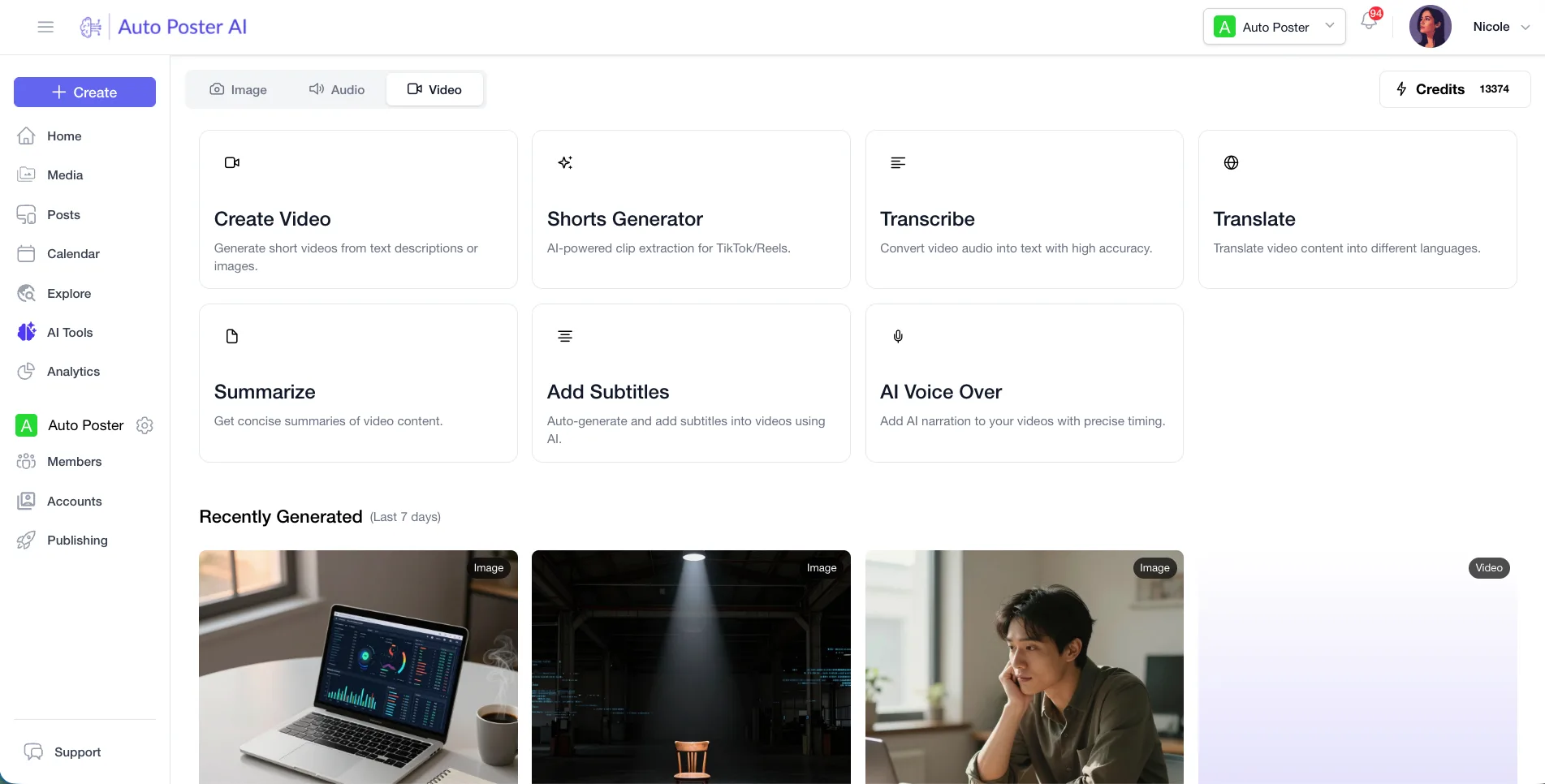
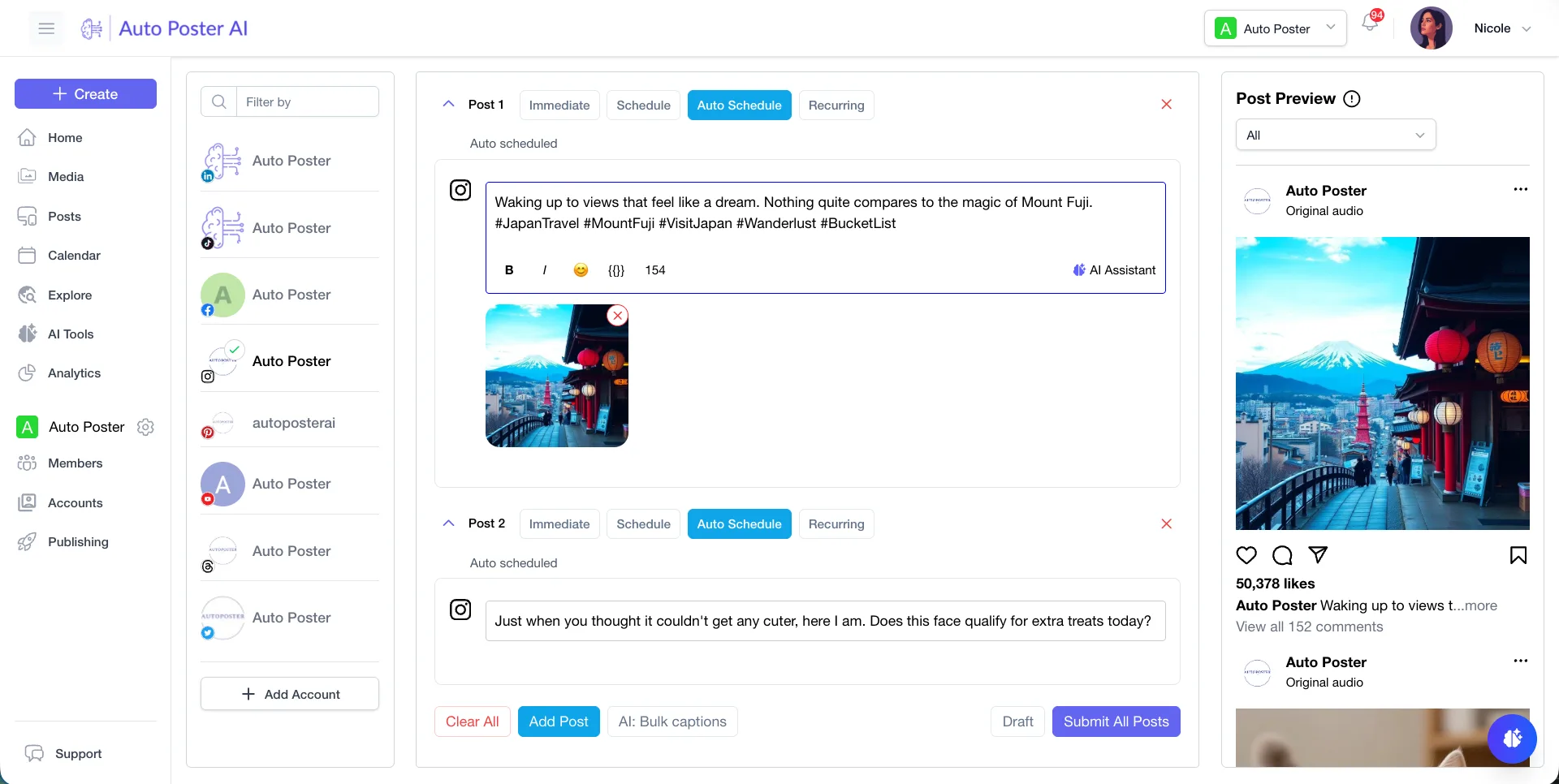
Finish a clip and schedule it to X, Bluesky, Mastodon, Telegram, Reddit, Discord and more, without exporting and uploading by hand. We found no scheduling on VEED.
Learn more →More generators under one allowance
Voice cloning, still images and music generation are in AI Studio. VEED's pages mention none of these.
Learn more →One price per account bundle
Professional is $15 a month for 5 accounts, whereas VEED bills per editor and charges when you invite users.
Learn more →Automation hooks
API and MCP access, plus autoposting flows over media folders, let an assistant or a script keep a queue filled.
Learn more →Where VEED is stronger
A real editor
VEED is a browser editor with a screen recorder, AI avatars and a Brand Kit. We do not offer a timeline editor, avatars or screen recording.
Third-party video models
VEED lists access to models such as Sora 2, Veo 3.1 and Kling for text-to-video and image-to-video.
Subtitle styling
Dynamic subtitles with karaoke and box highlights, fonts, colors and 125+ languages, plus SRT and VTT download.
How to switch from VEED
- 1
Download projects first. VEED has a guide to downloading a project, and you can cancel any time while keeping premium access until the cycle ends.
- 2
Use up AI credits before cancelling. They do not carry over between periods.
- 3
Subtitle files can be exported as SRT or VTT on a paid plan, which lets you reuse transcripts elsewhere.
Frequently asked questions
- How much does VEED cost?
Not confirmed. The pricing page we could read showed no plan prices, and third-party sites disagree, so we list none.
- Does VEED have a free trial?
It has a free start. Formal trials are limited to enterprise customers with at least 3 users, through sales.
- Can AutoPoster AI replace VEED?
Only for clipping, captions, dubbing and publishing. If you need layered editing, avatars or screen recording, keep VEED.
- Does AutoPoster AI have a free plan?
Yes, 1 account and 50 credits, plus a 7 day trial of paid features.
Other alternatives
Sources, checked on October 31, 2026
- https://www.veed.io/pricing
- https://www.veed.io/
- https://www.veed.io/tools/auto-subtitle-generator-online
- https://support.veed.io/en/articles/16658823-how-do-veed-subscriptions-work-across-mobile-and-web-platforms-and-how-can-i-access-features-on-both
- https://support.veed.io/en/articles/10531489-how-to-download-your-project
Pricing and features change, so check VEED's site before buying. VEED is a trademark of its owner. AutoPoster AI is not affiliated with it.
Switch from VEED to AutoPoster AI
Connect your accounts and try it on your own content.
Includes 7 days of Pro access • No credit card required • Seamless downgrade to free plan