
FeedHive alternative for video makers and teams who run conversations, not only content
FeedHive is a builder's scheduler, with workflows, a CLI, an MCP server and AI text and images, sold in euros. Its Creator plan allows 30 scheduled posts up to 14 days ahead. AutoPoster AI suits you better if you start from video or need comment-to-DM and WhatsApp broadcasts.
Choose AutoPoster AI if
- You start from long videos and want clips, subtitles, dubbing and voiceover in one place.
- You want comment-to-DM on Facebook and Instagram or WhatsApp broadcasts, which we did not find explained on FeedHive's site.
- You want a free plan. FeedHive's pricing page lists a 7-day trial and no free plan.
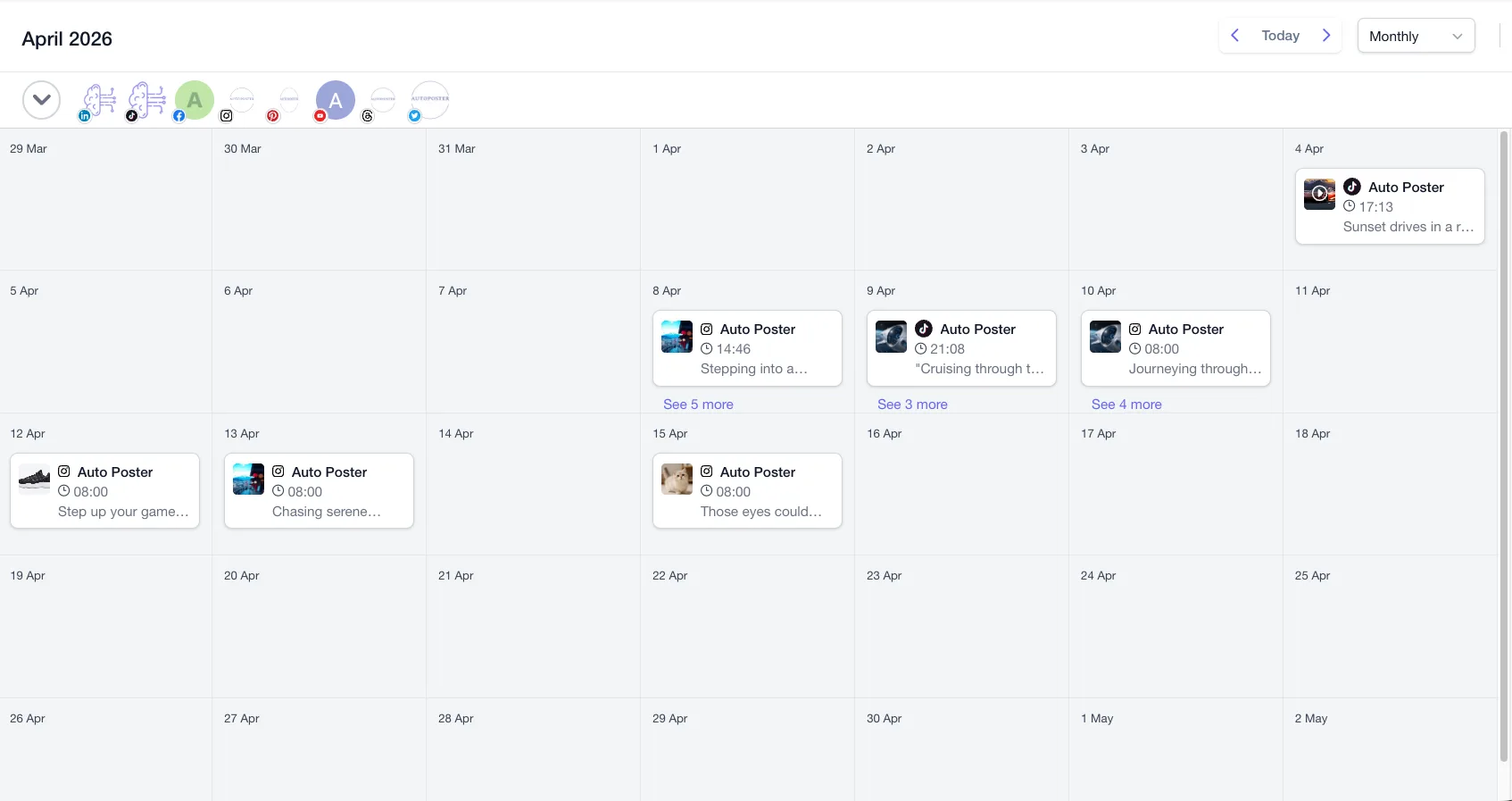
- You build bulk posts from media folders, rather than preparing a CSV with hosted media URLs.
Stay with FeedHive if
- You want a visual workflow builder with webhooks, conditions, and Zapier or Make triggers.
- You run many brands. Business lists 100 accounts and 50 workspaces, against 30 accounts on our Business plan.
- You work from a terminal. FeedHive has a CLI, a Claude Code plugin and a documented REST API.
- You want AI performance prediction on your drafts.
FeedHive in brief
FeedHive reads as a tool for people who like to automate. Its homepage sets a workflow builder, Vibe Marketing and Comment Triggers next to the usual calendar, and its CLI docs speak directly to developers and AI agents. Plan limits on scheduled posts and days ahead do most of the upselling.
Its pricing page lists euros, plus a launch offer that appears to double AI credits for 3 months. The page's check marks were not readable to us, so we cannot say which plan holds each feature. We also did not find a public changelog, so recent changes are not covered here.
FeedHive pricing
| Plan | Billed monthly | Billed annually | What you get |
|---|---|---|---|
| Creator | Not confirmed | Not confirmed | EUR 15 a month billed yearly (EUR 180). 4 accounts, 30 scheduled posts, 14 days ahead, 2.5K AI credits |
| Brand | Not confirmed | Not confirmed | EUR 22 a month billed yearly (EUR 264). 10 accounts, 5 workspaces, 500 scheduled posts, 60 days ahead, 10K AI credits |
| Business | Not confirmed | Not confirmed | EUR 69 a month billed yearly (EUR 828). 100 accounts, 50 workspaces, unlimited scheduled posts, 50K AI credits |
| Agency | Not confirmed | Not confirmed | EUR 239 a month billed yearly (EUR 2,868). 500 accounts, 100 workspaces, 100K AI credits |
AutoPoster AI vs FeedHive
| Feature | AutoPoster AI | FeedHive |
|---|---|---|
| Multi-platform scheduling | Yes | Yes: 10 networks, horizon set by plan |
| First comment scheduling | Yes | Yes: plan not readable on the page |
| Bulk posting from media folders | Professional plan | Partial: CSV with image or video URLs |
| Recurring posts | Yes | Partial: suggests posts to recycle |
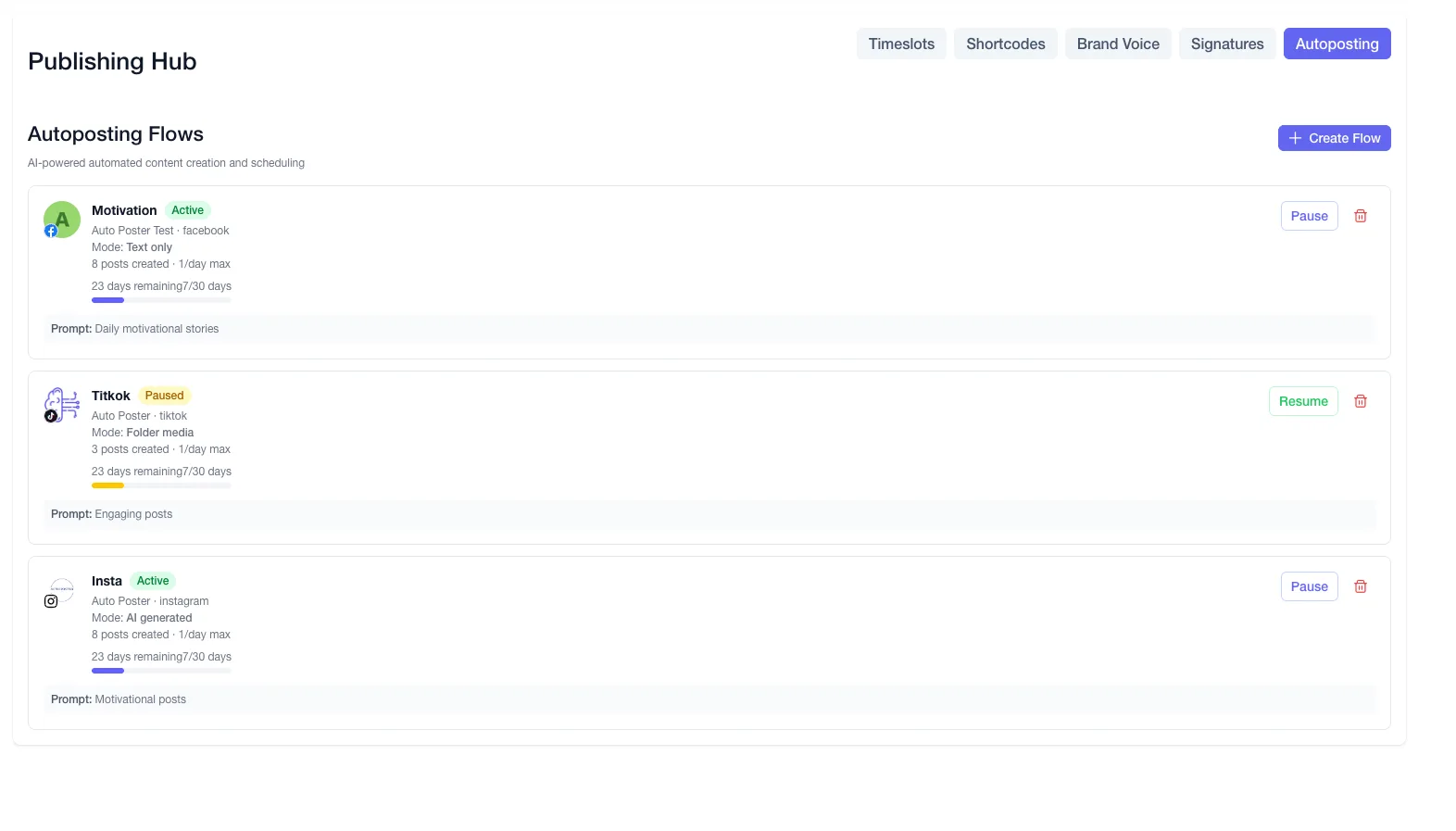
| AI autoposting flows | Professional plan | Partial: visual workflow builder, monthly run limits |
| AI captions and hashtags | Professional plan | Yes |
| AI image generation | Professional plan | Yes: Flux Pro and Nano Banana 2 |
| Long video to short clips | Professional plan | Not listed |
| Animated subtitles | Professional plan | Not listed |
| AI dubbing and voiceover | Professional plan | Not listed |
| Unified comment inbox | Brand plan | Yes: plan not stated |
| AI replies from your knowledge base | Business plan | Yes: Reply with AI, in your brand voice |
| Comment-to-DM rules (Facebook, Instagram) | Brand plan | Not listed: Comment Triggers are named but not explained |
| DM inbox | Brand plan | Partial: the page says messages, not DMs |
| WhatsApp inbox, templates and broadcasts | Brand plan | Not listed |
| Team roles and approvals | Brand plan | Yes: approval flows |
| Link in bio pages | Yes | Not listed: link shortening is listed |
| API | Professional plan | Yes: REST API and CLI |
| MCP for Claude, ChatGPT and Cursor | Professional plan | Yes |
"Not listed" means we did not find the feature on FeedHive's site on October 31, 2026. It may still exist or may ship later.
AutoPoster AI in practice
Where AutoPoster AI is stronger
Long video becomes posts
FeedHive's AI covers writing and images, and its feature list does not show clips or dubbing. AI Studio on Professional turns one recording into clips with subtitles, dubbing and voiceover.
Learn more →Plans in US dollars with a free start
Our Brand plan is $20 a month on annual billing for 10 accounts and 5 team members. We also offer a free plan with 1 account and 50 AI credits, where FeedHive lists a trial only.
Learn more →Messaging on Brand
Comment-to-DM on Facebook and Instagram, a DM inbox and WhatsApp broadcasts all sit on Brand, so you can talk to people as well as publish to them.
Learn more →Spam handling built in
Business adds AI spam moderation that hides on Facebook, Instagram and YouTube and deletes elsewhere, along with AI replies from a knowledge base. FeedHive's inbox page describes reply drafting.
Learn more →Where FeedHive is stronger
A far higher account ceiling
Business lists 100 accounts and 50 workspaces, and Agency lists 500 accounts. Our Business plan tops out at 30 accounts, which makes FeedHive stronger for very large rosters.
Real workflow automation
Rules for drafting, review, scheduling and recycling can run from post conditions, Zapier, Make or a custom HTTP request. Technical teams can shape this closely to their process.
Developer access in many forms
An official CLI can list accounts, inspect posts and create drafts, next to a REST API, an MCP server and a Claude Code plugin. Plan requirements were not stated on these pages.
CSV import with video URLs
The documented CSV takes text, titles, labels, accounts, schedule dates and comma-separated image or video URLs, which suits teams already planning in Sheets or Airtable.
How to switch from FeedHive
- 1
Pull your posts out before you leave. We found no export button in FeedHive's docs, but its REST API documents GET /posts with filters and pagination, and the CLI can list posts.
- 2
Keep any CSV files you imported. Their columns (Text, Media URLs, Labels, Scheduled) already describe your posts and are easy to recreate elsewhere.
- 3
Cancel under Settings, Subscription, Manage plan, Cancel plan. Refunds apply only if you cancel and ask within 48 hours of the invoice date.
- 4
Delete the account only when you are done, since that removes all posts, labels and workspaces.
Frequently asked questions
- What does FeedHive cost?
The pricing page lists Creator at EUR 15, Brand at EUR 22, Business at EUR 69 and Agency at EUR 239 a month, billed yearly. We show no dollar comparison because the page lists euros only, and it mentions savings of up to 30% without a readable monthly-billing price.
- Does FeedHive have an MCP server?
Yes, for creating, scheduling and publishing from an AI client. AutoPoster AI includes API and MCP access from Professional.
- Does FeedHive have a free plan?
Its pricing page advertises a 7-day free trial and mentions no free plan. AutoPoster AI has a free plan and a 7-day trial.
- Are FeedHive's lower plans limited?
Yes. Creator allows 30 scheduled posts and 25 drafts, up to 14 days ahead. Brand allows 500 scheduled posts up to 60 days ahead.
Other alternatives
Sources, checked on October 31, 2026
- https://feedhive.com/pricing
- https://www.feedhive.com/
- https://docs.feedhive.com/how-to-upload-posts-from-csv
- https://www.feedhive.com/features/workflow-builder
- https://www.feedhive.com/features/social-inbox
- https://docs.feedhive.com/cli
- https://www.feedhive.com/features/mcp-server
- https://docs.feedhive.com/rest-api/posts/endpoints
- https://www.feedhive.com/terms
- https://docs.feedhive.com/account-settings/delete-feedhive-account
Pricing and features change, so check FeedHive's site before buying. FeedHive is a trademark of its owner. AutoPoster AI is not affiliated with it.
Switch from FeedHive to AutoPoster AI
Connect your accounts and try it on your own content.
Includes 7 days of Pro access • No credit card required • Seamless downgrade to free plan