
Adobe Firefly alternative when generated media must be scheduled and published
Adobe Firefly is a generation studio tied to Adobe's apps, with image, video and audio tools and partner models. AutoPoster AI suits you better when the output goes straight into a content calendar with captions and replies. Firefly is the deeper creative tool, and we left US prices blank because the page we read showed won.
Choose AutoPoster AI if
- You want generated images queued and published without a download step.
- You need AI captions and a calendar across many networks.
- You want a comment inbox, DMs or review replies for the posts you publish.
Stay with Adobe Firefly if
- You live in Photoshop and other Adobe apps and want generation tied to them.
- You want partner models and premium video from one credit plan.
- You need fine control such as Generative Fill and Generative Expand.
Adobe Firefly in brief
Adobe sells Firefly on credit plans from Standard to Premium, with free daily generations to try it. Credits cover video, audio and partner-model output, and standard image features are described as unlimited on paid plans.
It is a creation tool, so what happens after the image exists is up to you. Our difference is the next step: caption, schedule, publish and reply. Plenty of teams use Firefly for the art and AutoPoster AI for the posting.
Adobe Firefly pricing
| Plan | Billed monthly | Billed annually | What you get |
|---|---|---|---|
| Free | $0/mo | Not confirmed | Daily free generations across image, video and audio, with limits that reset daily |
| Standard | Not confirmed | Not confirmed | 2,000 generative credits, up to 20 five-second videos. Price shown in Korean won on our read, so no USD figure confirmed |
| Pro | Not confirmed | Not confirmed | 4,000 credits, up to 40 five-second videos, 13 minutes of translation |
| Pro Plus | Not confirmed | Not confirmed | 10,000 credits, up to 100 five-second videos |
| Premium | Not confirmed | Not confirmed | 50,000 credits, unlimited Firefly Video Model |
AutoPoster AI vs Adobe Firefly
| Feature | AutoPoster AI | Adobe Firefly |
|---|---|---|
| AI image generation | Professional plan | Yes: standard features unlimited on paid plans, partner models cost credits |
| AI video generation | Professional plan | Yes: video limits by plan |
| AI dubbing and voiceover | Professional plan | Partial: audio and video translation minutes by plan |
| AI music generation | Professional plan | Yes: music minutes by plan |
| API | Professional plan | Not listed: the plans page does not mention an API |
| Mobile apps | Yes | Yes: Firefly on web and mobile |
| Multi-platform scheduling | Yes | Not listed |
| AI captions and hashtags | Professional plan | Not listed |
| Long video to short clips | Professional plan | Not listed |
| Unified comment inbox | Brand plan | Not listed |
| Analytics and best-time heatmap | Brand plan | Not listed |
"Not listed" means we did not find the feature on Adobe Firefly's site on October 31, 2026. It may still exist or may ship later.
AutoPoster AI in practice
Where AutoPoster AI is stronger
Generate, caption, schedule
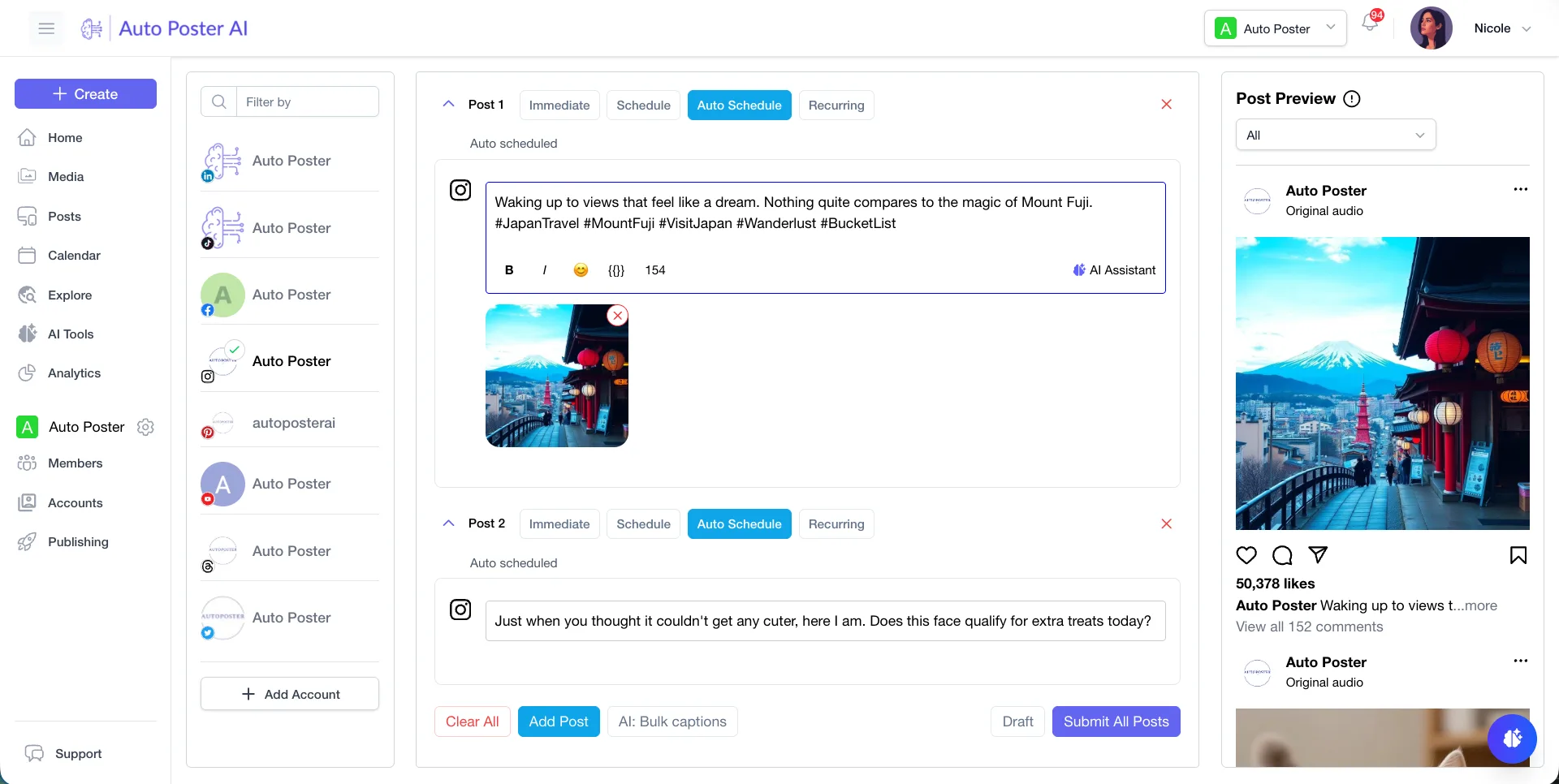
Make a visual in AI Studio, let AI write the caption and put it on the calendar for networks like Instagram, Pinterest and LinkedIn. Nothing leaves the account.
Learn more →Replies and reviews
Brand adds a comment inbox, DMs and review replies. Firefly's plans page lists generation tools only.
Learn more →Long video to clips
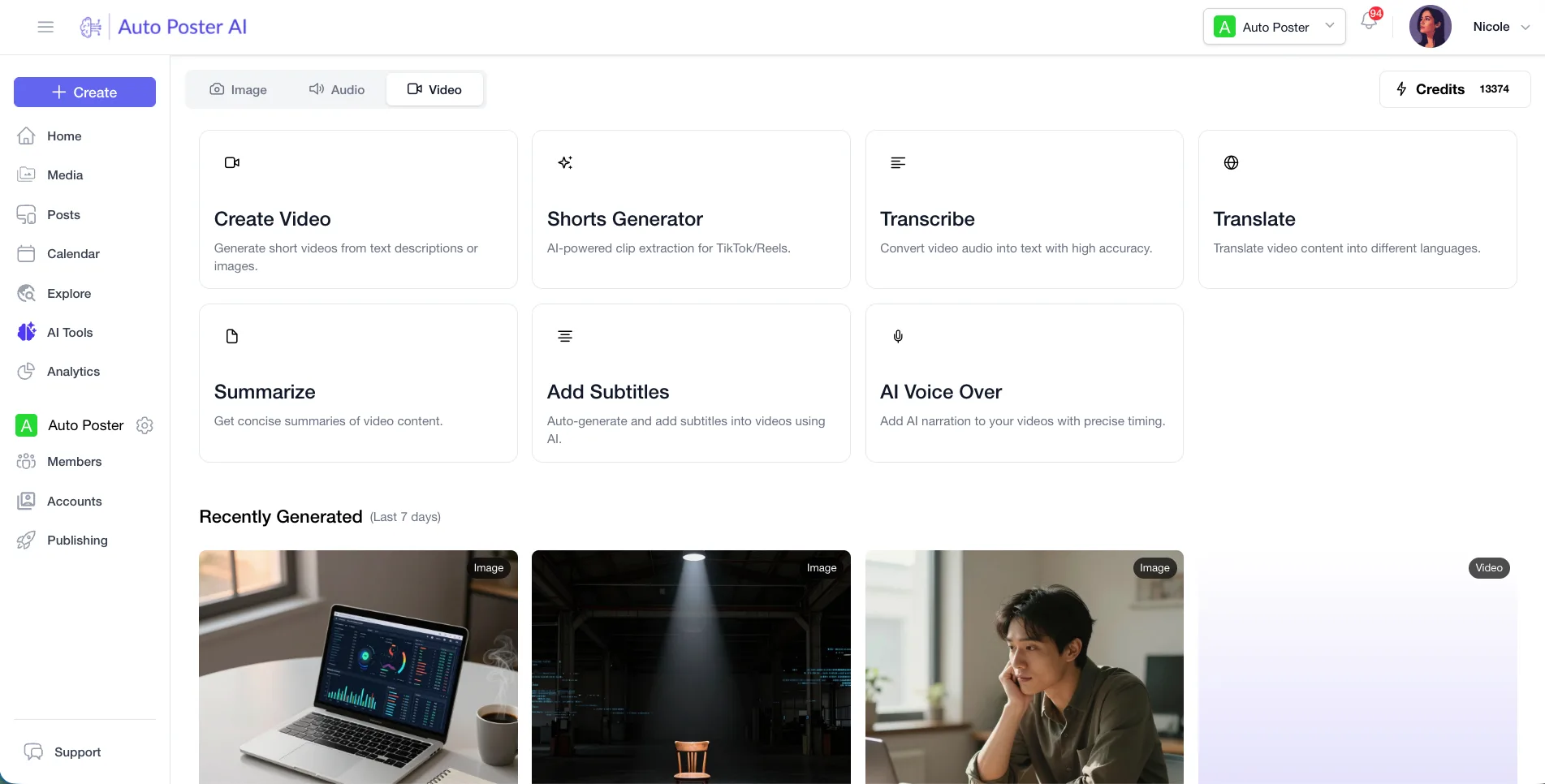
AI Studio turns long recordings into short clips with animated subtitles. Firefly's page lists generation and translation, not clip cutting.
Learn more →API and MCP on Professional
Our API and MCP let you drive publishing and AI Studio from your own tools. The Firefly plans page did not mention an API.
Learn more →Where Adobe Firefly is stronger
Wider creative range
Image, video, sound effects, music and translation all draw from one credit pool, and the Premium plan lists unlimited Firefly Video Model use. Our AI Studio is smaller.
Partner models
Paid plans can reach models from Google, OpenAI, Flux and others using credits. We do not offer model choice at that depth.
Free daily generations
The free plan gives daily generations across image, video and audio that reset each day. Our Free plan has 50 credits and a 7 day trial.
How to switch from Adobe Firefly
- 1
There is no content to import. Download generated images or video from Firefly before you cancel and upload them to AutoPoster AI. We did not look up a bulk export article.
- 2
Credits reset monthly and do not roll over, so use what remains before the plan ends.
Frequently asked questions
- How much does Adobe Firefly cost?
The page we read showed local-currency prices only, with no US dollars, so we left prices blank. Check adobe.com/products/firefly/plans for your region.
- Can Firefly schedule social posts?
We found no scheduling feature on its plans page. It generates media, and you publish it elsewhere.
- Can AutoPoster AI replace Firefly?
Only if you need basic image generation inside a posting workflow. For deep editing or video quality, keep Firefly and publish with us.
Other alternatives
Sources, checked on October 31, 2026
Pricing and features change, so check Adobe Firefly's site before buying. Adobe Firefly is a trademark of its owner. AutoPoster AI is not affiliated with it.
Switch from Adobe Firefly to AutoPoster AI
Connect your accounts and try it on your own content.
Includes 7 days of Pro access • No credit card required • Seamless downgrade to free plan