
Zoho Social alternative if you don't live in the Zoho suite and want AI media
Zoho Social is a natural fit for Zoho CRM and Desk users, and its free plan covers 6 channels. But the inbox, approvals and post export start at Premium, which a Zoho comparison page lists at $120 on monthly billing. AutoPoster AI includes inbox and approvals from Brand at $24 and adds video tools.
Choose AutoPoster AI if
- You want an inbox and approvals at $24 a month, or $20 on annual billing, rather than Zoho's Premium tier.
- You need 5 team members in the plan and don't want to pay for extra seats on a 3-user tier.
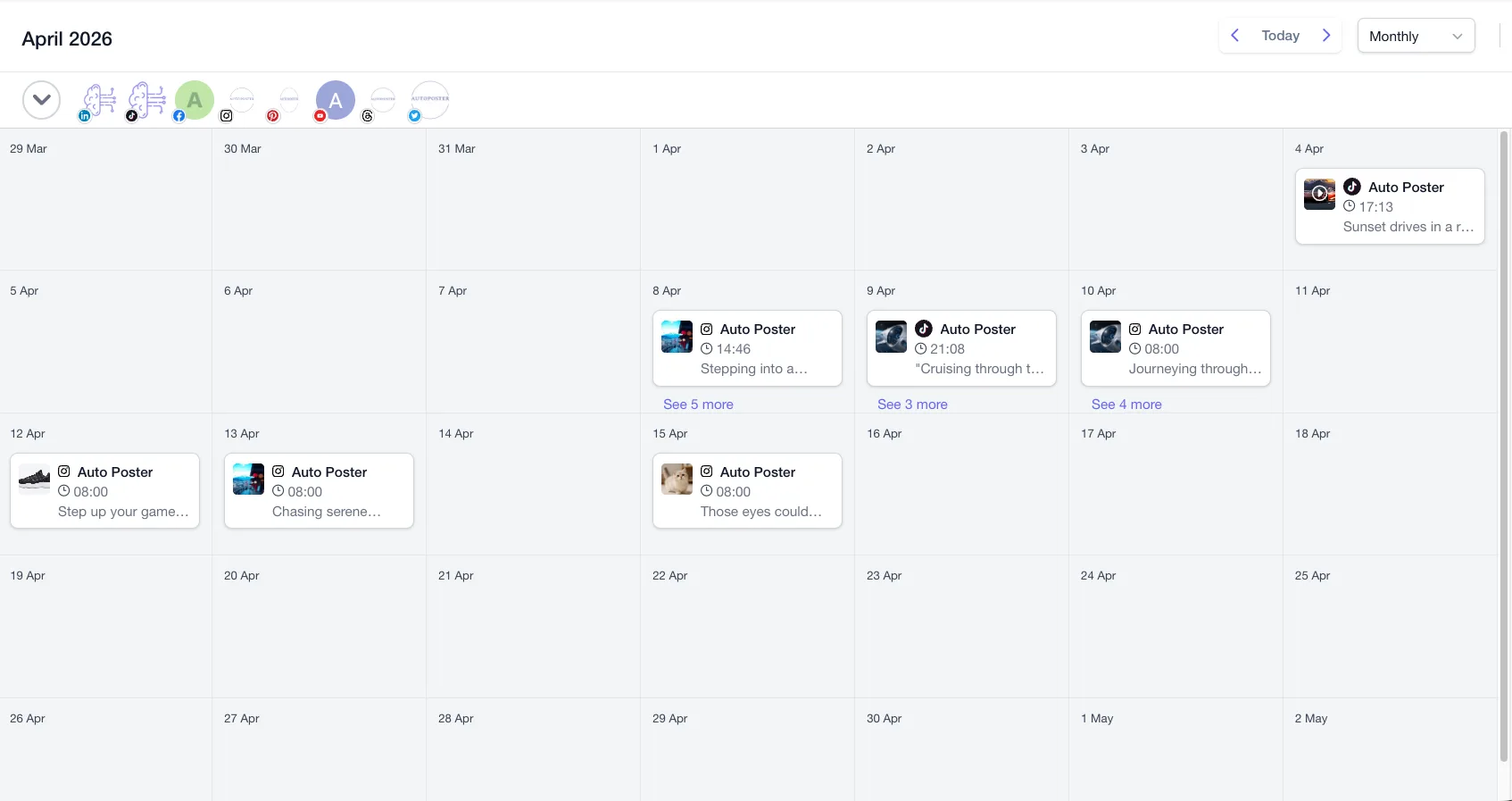
- You want AI clips, dubbing, voiceover and generated images, which we did not find listed by Zoho Social.
Stay with Zoho Social if
- Your business runs on Zoho CRM or Zoho Desk, and you want social leads and conversations to flow there.
- You want a free plan with 1 brand and 6 channels, against our free plan's 1 account.
- You run an agency that needs a client portal, free client logins and branded reports, or you need monitoring columns.
Zoho Social in brief
Zoho Social is priced and organised by brand, where each brand holds one profile per network. Features step up across six plans, and the tools many teams want, such as the Inbox, approvals and post export, begin at Premium.
The main reason to pick it is the rest of Zoho. Its Zoho CRM and Desk links turn social activity into leads and tickets, and it keeps shipping updates. If you don't use those apps and care more about producing video and images, a switch deserves a look.
Zoho Social pricing
| Plan | Billed monthly | Billed annually | What you get |
|---|---|---|---|
| Free | $0/mo | $0/mo | 1 brand, 6 channels, 1 team member, 5 AI credits |
| Standard | Not confirmed | Not confirmed | 1 brand, 1 team member, 40 AI credits, publishing and summary reports |
| Professional | Not confirmed | Not confirmed | 1 brand, 1 team member, 40 AI credits, bulk scheduling, monitoring, messages |
| Premium | $120/mo | Not confirmed | 1 brand, 3 team members, 80 AI credits, inbox, approvals, CRM and Desk integrations. The $120 figure comes from a Zoho comparison page, which lists 11 channels |
| Agency | Not confirmed | Not confirmed | 10 clients, 5 team members, client portal, branded reports |
| Agency Plus | Not confirmed | Not confirmed | 20 clients, 5 team members, all Agency features |
AutoPoster AI vs Zoho Social
| Feature | AutoPoster AI | Zoho Social |
|---|---|---|
| Multi-platform scheduling | Yes | Yes: no scheduled-post limit stated |
| First comment scheduling | Yes | Yes: Professional and up |
| Bulk posting from media folders | Professional plan | Yes: Professional and up, up to 350 posts per file |
| Recurring posts | Yes | Yes: repeat posting, Professional and up |
| AI captions and hashtags | Professional plan | Yes: Zia, with 5 to 80 credits by plan |
| AI image generation | Professional plan | Not listed |
| Long video to short clips | Professional plan | Not listed |
| AI dubbing and voiceover | Professional plan | Not listed |
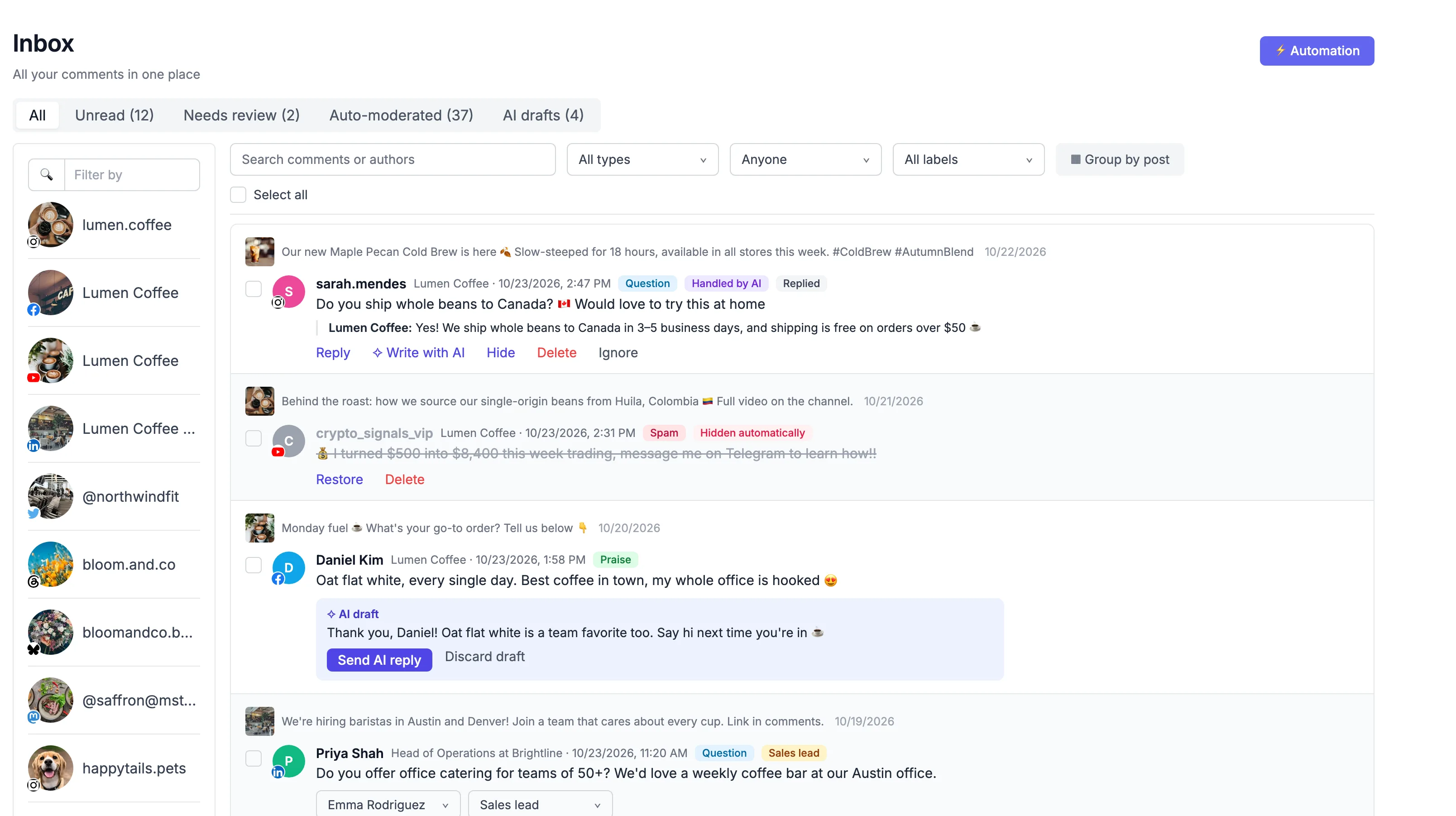
| Unified comment inbox | Brand plan | Yes: Premium and up |
| AI comment moderation | Business plan | Partial: manual moderation and rule-based assignment, with YouTube moderation mentioned |
| AI replies from your knowledge base | Business plan | Partial: Zia drafts replies from a prompt, Premium and up |
| DM inbox | Brand plan | Yes: messages from Professional |
| WhatsApp inbox, templates and broadcasts | Brand plan | Yes: WhatsApp Business channel on Premium and up |
| Analytics and best-time heatmap | Brand plan | Yes: full reports from Premium |
| Team roles and approvals | Brand plan | Yes: Premium and up |
| Link in bio pages | Yes | Not listed |
| API | Professional plan | Partial: by request, reviewed within 2 business days |
| Mobile apps | Yes | Yes |
"Not listed" means we did not find the feature on Zoho Social's site on October 31, 2026. It may still exist or may ship later.
AutoPoster AI in practice
Where AutoPoster AI is stronger
Inbox and approvals at a lower tier
Zoho puts both at Premium, quoted on one of its pages at $120 on monthly billing. Our Brand plan includes them at $24 on monthly billing.
Learn more →A seat count that fits small teams
Premium includes 3 team members, and the same Zoho page quotes extra people at $12 each a month. Brand includes 5, and Business includes 15.
Learn more →Counted by account, not by brand
Zoho brands hold only one profile per network, and extra brands are add-ons. Our plans are a simple count of accounts, so two pages on one network are just two accounts.
Learn more →Video and image creation
Zia writes and rephrases text. AI Studio cuts clips, adds subtitles, dubs video, and generates images and video.
Learn more →Where Zoho Social is stronger
Zoho CRM and Desk connections
Social leads and customer conversations can flow into Zoho's own CRM and helpdesk. For a company already on Zoho, that is hard to beat.
A more generous free plan
Free keeps 1 brand with 6 channels after the 15-day trial. Our free plan covers 1 account.
Agency tools
Agency plans add a client portal, free client logins and branded, scheduled reports for 10 or 20 clients.
Monitoring and steady updates
Its listening dashboard tracks mentions and keywords, which we don't offer. Q2 2026 added inbox Assignment Rules, Threads polls and audio on video.
How to switch from Zoho Social
- 1
On Premium or Agency, go to the Posts tab, click Export, choose CSV, then pick channels and a date range. It covers scheduled posts, drafts, unpublished posts and posts awaiting approval, with date, caption, URL and media files.
- 2
If you're on a lower plan, Zoho's comparison sheet doesn't show export, so copy posts by hand or plan an upgrade first.
- 3
Downgrade from your profile picture, Manage Subscription, then Change Plan. You return to Free with restricted features, and your data comes back if you upgrade later.
- 4
To remove your data, delete the portal once you're on Free. Zoho says a deleted portal can't be recovered, so export first.
Frequently asked questions
- How much does Zoho Social cost?
There is a Free plan. We could not confirm most paid prices, so those tiers show as not confirmed. One Zoho comparison page quotes Premium at $120 on monthly billing. Check its pricing page for your region.
- Which Zoho Social plan has an inbox?
Premium and above. Professional includes messages and monitoring, but the Inbox itself and approvals start at Premium.
- Can I export my posts from Zoho Social?
Yes on Premium, Agency and Agency Plus, as CSV or PDF. Zoho says the CSV can be reused with its Bulk Scheduler.
- Is AutoPoster AI a replacement for Zoho Social?
For publishing, inbox, approvals and analytics it can be. If Zoho CRM or Desk drive your process, or you need monitoring dashboards, Zoho Social is likely the better fit.
Other alternatives
Sources, checked on October 31, 2026
- https://www.zoho.com/social/pricing.html
- https://www.zoho.com/social/buffer-alternative.html
- https://www.zoho.com/sites/zweb/images/zoho_general_pages/zoho-social-plan-comparison-usd.pdf
- https://www.zoho.com/social/features.html
- https://help.zoho.com/portal/en/kb/social/faqs/plan-and-pricing/articles/plans-frequently-asked-questions
- https://www.zoho.com/social/api.html
- https://help.zoho.com/portal/en/community/topic/whats-new-in-zoho-social-q2-recap
- https://help.zoho.com/portal/en/kb/social/publishing-and-scheduling/scheduling-posts/articles/exporting-posts
- https://help.zoho.com/portal/en/kb/social/manage-account/articles/switching-to-another-plan
- https://help.zoho.com/portal/en/kb/social/manage-account/articles/closing-your-account
Pricing and features change, so check Zoho Social's site before buying. Zoho Social is a trademark of its owner. AutoPoster AI is not affiliated with it.
Switch from Zoho Social to AutoPoster AI
Connect your accounts and try it on your own content.
Includes 7 days of Pro access • No credit card required • Seamless downgrade to free plan